System Design: Live Video Streaming Platform for 50 Million Concurrent Viewers
High-level design of a live streaming system at FIFA scale — CDN architecture, adaptive bitrate, low-latency delivery, and where things actually break at 50M viewers.

This post walks through the high-level design (HLD) of a live video streaming platform at FIFA World Cup scale. It's written for engineers who are either preparing for system design interviews or are newer to backend infrastructure. We won't skip the hard parts — but we'll explain them clearly.
By the end, you should understand how a video gets from a stadium camera to 50 million screens simultaneously, and what breaks at each step if you get the design wrong.
What Makes Live Streaming Hard
Before jumping into diagrams, it helps to understand why this problem is interesting.
Most systems serve stored data — a database row, a file, a cached response. The data exists before the user asks for it. You can precompute, cache, and serve it at your own pace.
Live streaming is fundamentally different. The data doesn't exist yet. A video frame captured at the stadium must reach a viewer's phone within seconds — while simultaneously being delivered to 50 million other people around the world, at multiple quality levels, over wildly different network conditions.
That constraint — create, encode, distribute, and play in near-real-time at massive scale — drives every architectural decision below.
Start With the Math
Before designing anything, always estimate the scale. This is one of the first things an interviewer will ask.
Given:
- Peak concurrent viewers: 50 million
- Average bitrate per user: 5 Mbps
Total outbound bandwidth:
That's 250 terabits per second of outgoing video data. No single server, no single datacenter, and no single CDN provider handles 250 Tbps. This number immediately tells you: the design must be massively distributed, and the most important thing you can do is prevent that 250 Tbps from ever hitting your origin servers.
Storage for DVR (30-minute rewind):
If you support 6 quality levels (240p through 4K), you need to store 30 minutes of each:
With 16 simultaneous matches in the group stage, that's ~13 TB just for DVR buffers — manageable, but worth planning for.
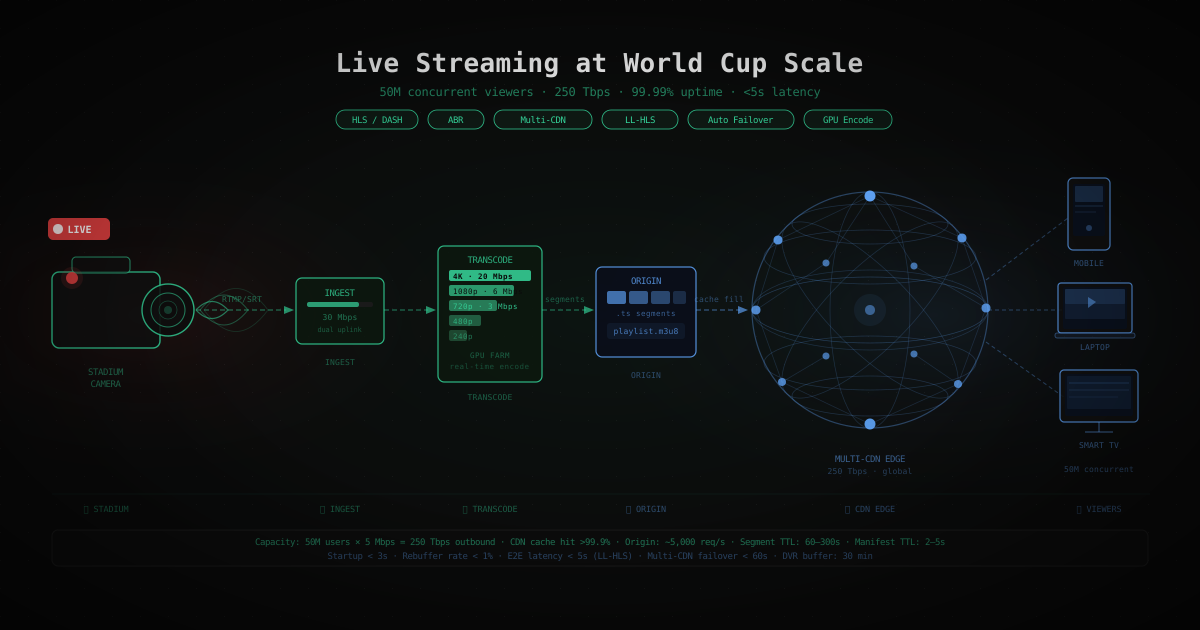
The System, End-to-End
Here's the full journey a video frame takes from stadium to screen:
Every step in this chain has failure modes, scaling limits, and design choices. Let's go through each one.
Step 1: Video Ingestion — Getting the Stream Into Your System
What happens at the stadium
A professional broadcast camera outputs an uncompressed video signal. At 1080p 60fps, that's roughly 3 Gbps per camera. You can't send that over the internet.
An on-site encoder (a dedicated hardware box or software like FFmpeg running on a powerful machine) compresses this to a single high-quality "contribution stream" — typically 15–50 Mbps. This is your master input.
The transport protocol
This compressed stream is pushed into your system using one of two protocols:
- RTMP (Real-Time Messaging Protocol): The legacy standard. Simple, widely supported, but adds latency because it requires a persistent TCP connection with acknowledgments.
- SRT (Secure Reliable Transport): The modern replacement. Works over UDP, handles packet loss better, and is increasingly used for contribution feeds when low latency matters.
Why the ingest layer is critical
The ingest layer receives the contribution stream and is the single entry point for all your subsequent processing. If it goes down, every viewer loses the stream.
Design principles for ingest:
- 02At least two ingest endpoints per match (primary and backup). The on-site encoder sends the stream to both simultaneously.
- 04Geographically distributed ingest points — the encoder pushes to the nearest ingest node, which then relays internally. This reduces the risk of a transatlantic network hiccup killing the stream.
- 06Health monitoring — detect if the ingest stream drops and trigger failover within seconds.
Step 2: Transcoding — One Stream Becomes Many
The problem
Your contribution stream is 1080p at 30 Mbps. Your viewers are on phones with 5 Mbps connections, laptops on 50 Mbps Wi-Fi, and TVs capable of 4K. You can't send the same 30 Mbps stream to everyone.
Transcoding converts the single high-quality input into multiple output streams at different resolutions and bitrates — called a rendition ladder.
A typical rendition ladder:
| Quality | Resolution | Bitrate |
|---|---|---|
| 240p | 426×240 | 300 Kbps |
| 480p | 854×480 | 1.5 Mbps |
| 720p | 1280×720 | 3 Mbps |
| 1080p | 1920×1080 | 6 Mbps |
| 4K | 3840×2160 | 20+ Mbps |
How long does transcoding take?
Video encoding (specifically H.264 or H.265 codec) is computationally expensive. A single CPU core can encode roughly real-time at 720p. For 5–6 quality levels simultaneously, you need a transcoding farm: a pool of machines (often GPU-accelerated) that process the stream in parallel.
For a 10-second input segment:
- A CPU-based encoder might take 8–12 seconds per quality level
- A GPU-based encoder takes 1–3 seconds per quality level
Since you need all 6 qualities encoded and available before the 10-second segment expires, GPU acceleration is not optional at this scale — it's the only way to keep latency acceptable.
Real-time encoding vs. segmented encoding
For live streams, you encode in small chunks called segments. Each segment is typically 2–10 seconds of video. The encoder processes each segment as it arrives, and the result is immediately passed to the packager. This pipeline approach means the 10th segment is being encoded while the viewer is still watching the 5th.
Step 3: Packaging — HLS and DASH
Once transcoded, the segments need to be packaged into a format that video players understand.
HLS (HTTP Live Streaming)
Developed by Apple, HLS works by:
- 02Breaking video into small
.ts(MPEG Transport Stream) files, typically 2–6 seconds each - 04Creating a manifest file (
.m3u8) that lists all available segments and quality levels
A viewer's player downloads the manifest, picks the right quality level, and then downloads segments sequentially. When a new segment is available (every few seconds), the player fetches it.
The manifest for our multi-quality stream looks like:
DASH (Dynamic Adaptive Streaming over HTTP)
MPEG-DASH is the open standard alternative to HLS. It works similarly but is not natively supported on Apple devices (which is why most platforms support both). If you're designing for global scale, you typically package in both HLS and DASH.
Why standard HTTP matters
Both HLS and DASH deliver video over plain HTTP. This is a crucial design choice — it means every segment is just an HTTP GET request, which means CDNs can cache them exactly like static files. This is what enables massive scale: CDN edge nodes cache the segments, and your origin only serves each segment once per edge node instead of once per viewer.
Step 4: Adaptive Bitrate Streaming (ABR)
The problem it solves
A viewer in Mumbai on a 4G connection might have 8 Mbps available one moment and 2 Mbps the next (elevator, crowded stadium, cell tower handoff). If you lock them into 1080p, they buffer. If you lock them into 240p forever, they see a blurry stream even when their connection recovers.
ABR solves this by letting the player dynamically switch quality based on measured network conditions.
How ABR works
The player maintains a buffer (typically 15–30 seconds of video). It measures:
- Download speed of recent segments
- Buffer level (how many seconds of video it has queued up)
Using an ABR algorithm (like BOLA or a throughput-based algorithm), it decides which quality to request for the next segment. If the buffer is draining faster than it's filling (network slowdown), it drops to a lower quality. If the buffer is building up, it steps up to a higher quality.
The key insight: the player is the one making quality decisions, not your server. Your server just needs to have all quality levels available at all times.
Step 5: Origin Architecture
What the origin does
The origin layer is the authoritative source for video segments. CDN edge nodes that don't have a segment cached will fetch it from origin. The origin doesn't serve end users directly — only CDN nodes.
The origin bottleneck problem
With 50 million concurrent viewers, even if 99.9% of requests are served from CDN cache, that's still 50,000 requests per second hitting origin. At 10-second segments, each viewer triggers about 6 requests per minute, meaning:
That's manageable — but only if your CDN cache hit rate stays above 99.9%. For live streaming, this is achievable because everyone is watching roughly the same point in the stream (the same segments are being requested by millions of viewers within the same 10-second window).
Origin design
Keep origin stateless — each origin server reads from the same object store, so you can add/remove origin capacity without coordination. Use at minimum 3 origin servers behind a load balancer, across at least 2 availability zones.
For DVR support, segments stay in the object store for 30 minutes before being deleted (or archived to cheaper cold storage if you want longer replay).
Step 6: CDN — The Real Work
This is where 250 Tbps gets served. CDNs do not get nearly enough credit in system design discussions.
What a CDN does
A CDN (Content Delivery Network) is a geographically distributed network of servers (edge nodes) placed close to end users. When a viewer requests a video segment:
- 02DNS resolves to the nearest edge node (via anycast or latency-based routing)
- 04The edge node checks if it has the segment cached
- 06Cache hit: serves it directly, zero origin load
- 08Cache miss: fetches from origin, caches it, serves to viewer
For live streaming, once the first viewer in a region requests a segment, every subsequent viewer in that region gets it from cache. The CDN turns a 50-million-viewer problem into a "how many distinct edge regions do you have?" problem.
Multi-CDN strategy
Running a single CDN provider is a single point of failure. If Akamai or Cloudflare has an outage during the World Cup final, you lose the stream entirely.
The solution is multi-CDN with active traffic distribution:
A traffic steering layer (Cloudflare Load Balancing, NS1, or a custom DNS-based system) splits traffic across multiple CDNs continuously. Benefits:
- Failover: If CDN A degrades, shift 100% to CDN B and C within seconds
- Performance: Route users to whichever CDN has better latency to their region
- Cost optimization: Different CDNs have better peering agreements in different regions
Cache optimization for live streams
Unlike video-on-demand (where all segments already exist), live streaming creates new segments continuously. The challenge is that the most-requested segment is always the newest one, which hasn't had time to spread across the CDN's edge nodes.
Strategies to maximize cache hit rate on live content:
- 02
Segment duration tuning: Longer segments (6–10 seconds) stay in cache longer and are requested less frequently. Shorter segments (2 seconds) reduce latency but increase origin load. For the World Cup, 4–6 second segments are a reasonable balance.
- 04
CDN pre-warming: Before a match starts, push the first few segments directly to edge nodes (CDN push vs. pull) so the first wave of viewers doesn't all miss cache simultaneously.
- 06
Consistent segment naming: Ensure segment URLs are deterministic and identical for all viewers requesting the same content. Any randomness in URLs breaks caching.
- 08
Short TTLs on manifests, long TTLs on segments: Manifest files (
.m3u8) change every few seconds as new segments are added — set a 2–5 second TTL. Individual segments are immutable once created — set a 60–300 second TTL.
Step 7: Low-Latency Streaming
Standard HLS has 20–30 seconds of latency end-to-end. That's the delay between what's happening at the stadium and what viewers see. For a sport where everyone's following social media, 30 seconds is long enough for a goal to be spoiled by Twitter before you see it.
Why standard HLS is slow
The latency comes from three places:
- 02Encoder buffering: The encoder accumulates a full segment (6 seconds) before outputting it
- 04Player buffering: The player preloads several segments (15–30 seconds) to handle network variation
- 06CDN propagation: Time for a segment to replicate from origin through CDN tiers
Low-Latency HLS (LL-HLS)
Apple introduced LL-HLS to address this. Key changes:
- Partial segments: Instead of waiting for a full 6-second segment, the encoder outputs 200ms "parts" that are immediately available for download
- Playlist delta updates: Players only download the changed portion of the manifest, not the full file, on each poll
- Blocking playlist reload: The player can make a request that "blocks" until a new part is available, instead of polling every 2 seconds
With LL-HLS, latency can be reduced to 2–5 seconds, approaching broadcast TV delay.
LHLS vs. WebRTC
For ultra-low latency (<1 second), some platforms use WebRTC — the same technology that powers video calls. WebRTC achieves sub-second latency but has significant tradeoffs: it's harder to scale because it uses persistent connections rather than cacheable HTTP segments. At 50 million viewers, the connection management overhead is prohibitive.
For the World Cup: LL-HLS at 3–5 second latency is the right call. Reserve WebRTC for interactive use cases like sports commentary or fan video rooms.
Failure Handling and Disaster Recovery
What can fail
| Component | Failure Impact | Recovery Approach |
|---|---|---|
| Stadium encoder | All viewers lose the stream | Redundant encoder (backup unit + separate uplink) |
| Ingest node | New segments stop arriving | Two ingest endpoints; encoder pushes to both |
| Transcoder farm node | Capacity reduction | Auto-scaling group; stateless design |
| Origin server | CDN can't fill misses | Multiple origin servers in active-active; CDN has grace period |
| CDN provider | Region or global outage | Multi-CDN; traffic steering switches within 30 seconds |
| Object store | Segments unavailable | Cross-region replication; S3 already provides 11 nines durability |
| Network path (stadium → ingest) | Stream drops | Dual ISP uplinks at stadium using different carriers |
The 99.99% availability requirement
99.99% uptime means a maximum of 52 minutes of downtime per year, or 5.3 seconds per match (assuming 90-minute matches). For a live event, even 30 seconds of outage is catastrophic.
To hit this:
- No single point of failure at any layer
- Automatic failover — human intervention is too slow; failover must be scripted and tested in advance
- Regular chaos testing — simulate failures before the World Cup, not during it
- Health probes at every layer with automated traffic shifting on failure detection
Monitoring and Observability
You cannot fix what you cannot see. For a live streaming platform, monitoring is not optional — it's part of the core design.
Player-side metrics (most important)
Instrument the video player to report metrics every 30 seconds:
- Buffering ratio: What percentage of playback time was spent buffering? Target: <1%
- Startup time: How long from press play to first frame? Target: <3 seconds
- Quality switches: How often did the player change quality levels? (Too many = ABR instability)
- Error rate: HTTP errors, player crashes, stream failures
These metrics should be available in a dashboard with per-region, per-CDN, and per-ISP breakdowns. A spike in buffering ratio in Southeast Asia is actionable; "something is slow somewhere" is not.
Infrastructure metrics
- CDN cache hit rate per segment age: Healthy: >99% for segments older than 30 seconds
- Origin request rate: A spike here means CDN cache is not working
- Transcoder queue depth: How far behind is encoding relative to live? Target: <10 seconds
- Ingest stream health: Segment arrival cadence, bitrate stability, any gaps
Alerting thresholds
Set alerts (not just dashboards) for:
- Buffering ratio >2% for >60 seconds in any major region
- Ingest stream missing segments for >5 seconds
- Any CDN provider showing >5% error rate
- Origin request rate >200% of baseline (suggests CDN caching failure)
Alerts should page an on-call engineer who can act, not send an email.
Handling Traffic Spikes: The Goal Notification Problem
One of the most dangerous moments in a streaming platform's life is a massive simultaneous join event. A goal is scored, a push notification goes out to 200 million phones, and 10 million people tap "watch now" within 30 seconds.
What happens if you're not prepared
Each new viewer joins a new session. Each new session player downloads the manifest, then downloads the last 3–4 buffered segments to fill its buffer. That's a 30x burst in request rate over 30 seconds. If your CDN edge nodes weren't caching the current segments (e.g., match just started in a new region), origin gets hammered.
Mitigation strategies
- 02
Pre-position CDN edge nodes: Before the match, pre-warm edge nodes in high-viewership regions with the initial segments. Even warming 90 seconds of content eliminates the cold start problem.
- 04
Stagger the notification: Instead of pushing notifications to all 200 million subscribers simultaneously, stagger delivery over 30–60 seconds. The user experience is nearly identical but the join curve goes from a spike to a ramp.
- 06
Use virtual waiting rooms for ultra-high join rates: For the World Cup final specifically, consider a virtual queue for the first 5 minutes where new viewer requests are admitted in batches, giving CDN caches time to warm.
- 08
Design for 3× peak capacity: Your CDN contract and origin capacity should support at least 3× the expected peak. Spikes are never perfectly predictable.
Scaling from 5 Million to 100 Million Viewers
The architecture described above scales gracefully because each layer is independently horizontal:
| Layer | How it scales |
|---|---|
| Ingest | Add more ingest endpoints; route by geography |
| Transcoding | Add GPU nodes; each segment is independent |
| Object store | S3/GCS scale automatically |
| Origin | Add stateless origin servers behind load balancer |
| CDN | CDN capacity is virtually unlimited; add CDN providers |
The one layer that doesn't scale linearly is the traffic steering/multi-CDN layer — because it makes real-time decisions. This should be a managed service (NS1, Cloudflare Traffic Manager) rather than a self-built system.
For a World Cup going from 5M to 100M viewers:
- Transcoding capacity scales up in minutes with cloud auto-scaling
- CDN contracts need to be negotiated in advance (you can't burst to 100 Tbps on short notice without pre-arranged capacity commitments)
- Monitor per-CDN capacity thresholds and have runbooks ready for shifting load between providers
4K Without Exploding Costs
4K streaming at 20 Mbps per viewer is 4× the bandwidth cost of 1080p. The math for 50 million viewers all watching 4K would be staggering.
In practice, 4K has natural cost constraints:
- Only users on very fast connections (50+ Mbps) qualify
- Smart TVs and high-end laptops, not phones
- Realistically 2–5% of viewers at peak
But to keep costs reasonable:
- 02Encode 4K only once and serve from CDN like every other quality
- 04Use H.265/HEVC instead of H.264 for 4K — same visual quality at 40% lower bitrate
- 06Per-user 4K eligibility: Only offer 4K quality in the manifest to devices that can play it AND are on connections that support it (detect via initial manifest request speed or device type hints)
- 08Aggressive CDN caching of 4K segments: 4K viewers cluster in wealthy regions with good CDN coverage — cache hit rates are high
Quick Reference: Answering Interviewer Questions
Q: What if a CDN provider goes down during the World Cup final?
Traffic steering layer detects elevated error rates (within 30–60 seconds via health probes) and shifts traffic to other CDN providers. CDN B and C absorb the load. Pre-negotiated capacity commitments ensure they can handle the shift. Total viewer impact: 30–60 seconds of potential buffering for affected users during transition.
Q: How would you reduce latency from 30 seconds to under 5 seconds?
Adopt Low-Latency HLS (LL-HLS): partial segments at 200ms, blocking manifest reloads, and reduced player buffer targets (3–5 seconds instead of 30). Requires CDN support for LL-HLS (Cloudflare and Fastly both support it natively).
Q: How would you handle 10 million users joining simultaneously?
Pre-warm CDN edge nodes before match start. Stagger push notifications. Ensure origin auto-scaling policies are pre-triggered to warm capacity before the spike. CDN cache hit rate stays high because all 10 million users want the same segments (they're all joining the live stream at the same point).
Q: What metrics would you monitor to detect stream degradation?
Rebuffering ratio (primary signal), startup time, CDN cache hit rate, origin request rate anomalies, and transcoder queue lag. Set automated alerts, not just dashboards.
What We Didn't Cover
This post focused on the core live streaming flow. There are several areas worth independent deep dives:
- DRM (Digital Rights Management): FIFA content has strict broadcast rights. Every stream needs AES-128 or Widevine/FairPlay encryption with proper key rotation.
- Ad insertion (SSAI): Server-side ad insertion stitches ads into the stream server-side, so CDN delivers one stream with ads pre-inserted rather than having clients pull ads separately.
- Personalization at CDN edge: Using edge compute (Cloudflare Workers, Lambda@Edge) to inject per-user tokens, A/B test bitrate ladders, or route users to regional ad inventory.
- Audio commentary tracks: Multi-language audio requires packaging separate audio renditions and linking them in the master manifest. Same video, 8 audio tracks — managed via HLS audio groups.
Summary
Live streaming at World Cup scale is a distributed systems problem where the primary goal is keeping your origin out of the critical path for 99.9% of requests. Every design decision — segment duration, CDN caching TTLs, multi-CDN topology, ABR algorithm — is in service of that goal.
The technology stack is mature and well-understood (HLS, CDN, ABR). What separates a platform that holds up during the final from one that buckles is:
- Redundancy at every single layer
- Automatic failover, not manual runbooks
- Real-time observability that gives operators 60 seconds to act before viewers notice
- Capacity headroom you negotiated weeks before the tournament started
If you're preparing for system design interviews, the frameworks here — capacity estimation first, bottleneck identification second, then a layer-by-layer design with failure modes at each step — apply far beyond streaming. This is how any large-scale read-heavy, latency-sensitive distributed system gets designed.