Ad Click Aggregator System Design: Kafka, Flink, and Real-Time Analytics at Scale
How to build a system handling 10,000 ad clicks per second — Kafka for event queuing, Flink for stream processing, deduplication, and ClickHouse for real-time analytics.

Every time you click an ad on Facebook, Instagram, or a news site, three things happen in under 100 milliseconds: you get redirected to the advertiser's website, the click gets logged, and a counter somewhere goes up by one.
At Facebook's scale, that's roughly 10 billion ad interactions every day. At a medium-sized ad platform, it's still 10,000 clicks every second. Building a system that handles this reliably — without losing clicks, counting the same click twice, or making advertisers wait minutes for their data — is a genuinely hard engineering problem.
This post walks through how such a system is designed. No prior experience with distributed systems needed. We'll introduce each technology only when we need it, and always explain why before how.
What Are We Actually Building?
Imagine you're an advertiser who paid to run a banner ad. You want to know: how many people clicked it in the last hour? Which device — phone or desktop? Which countries?
The system we're building answers those questions. It:
- 02Records every ad click the moment it happens
- 04Immediately redirects the user to the advertiser's site (so they don't notice any delay)
- 06Makes sure no click is counted twice (duplicate clicks happen constantly due to network retries)
- 08Crunches the numbers and makes them available to advertisers within 60 seconds
Requirements
What the system must do
- When a user clicks an ad, send them to the advertiser's website immediately
- Advertisers can ask "how many clicks did my ad get, broken down by minute?"
- Show total clicks, unique visitors, and clicks by device type (phone, desktop, tablet)
Performance targets
| Goal | Target |
|---|---|
| How fast the user gets redirected | Under 100ms (imperceptible) |
| How soon click data is visible to advertisers | Within 60 seconds of the click |
| Duplicate click protection | Count each click exactly once |
| How long raw click logs are kept | 90 days |
| How long summarized metrics are kept | 5 years |
| How fast advertisers can query their data | Under 1 second |
| Uptime for click recording | 99.99% (less than 1 hour downtime per year) |
How big is this?
| Metric | Value |
|---|---|
| Peak clicks | 10,000 per second |
| Size of each click record | ~500 bytes (about the size of a short tweet) |
| Daily storage for raw clicks | ~430 GB |
| Summarized rows created per day | ~1.4 million |
At 10,000 clicks per second, a simple approach of "write to a database on every click" would immediately overwhelm any single database. This is why the architecture looks the way it does.
The Big Picture
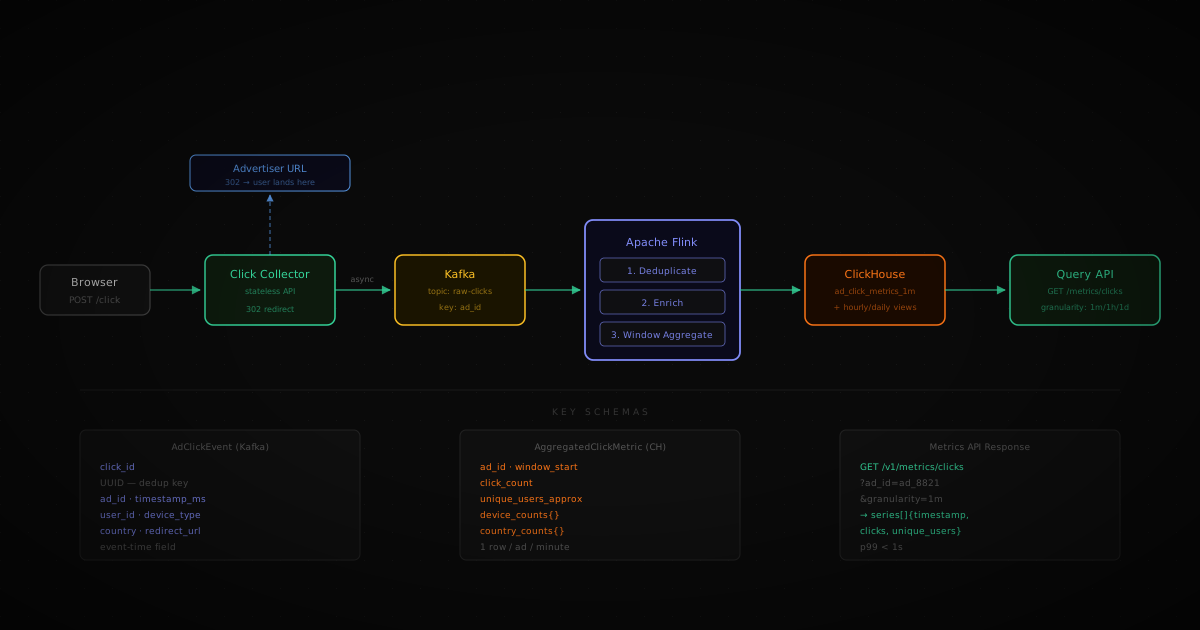
Before diving into components, here's the journey of a single click:
The key insight: the redirect and the counting are completely separate. You get sent to the advertiser's site instantly. The counting happens in the background, asynchronously. This is why you don't feel any delay when clicking ads.
Component 1: The Click Collector
This is a simple web server. Its only job is:
- 02Receive the click
- 04Send you to the advertiser's site (the
302 redirect— an HTTP response that says "go here instead") - 06Drop the click event into the message queue
That's it. It holds no data. It does no counting. It doesn't even know what the redirect URL is from memory — it looks that up from a fast in-memory cache using the ad ID. This keeps it stateless and easy to scale horizontally (just run more copies).
Why fire-and-forget? The message queue step is asynchronous. The collector doesn't wait for confirmation that the click was queued — it sends you to the advertiser's site first, then queues the event. This is what keeps redirects under 100ms even at 10,000 clicks per second.
Component 2: The Message Queue (Kafka)
Think of Kafka as a very fast, very durable conveyor belt. Click events go in one end, and processors consume them from the other end, in order, at their own pace.
Why not write clicks directly to a database?
Databases are great for reading and writing records one at a time. But at 10,000 clicks per second, you'd need an enormous database cluster just to keep up with writes — and if the database had a slow moment, clicks would pile up and get lost. Kafka solves this by acting as a buffer. Processors can fall behind and catch up later; no events are lost.
Kafka organizes events into topics (like named inboxes). Our topic is called raw-clicks. Within a topic, events are split into partitions — parallel lanes that allow multiple processors to work simultaneously.
We partition by ad_id (the ID of the ad that was clicked). This means all clicks for the same ad always go to the same lane — which matters for the deduplication step next.
Kafka configuration for this system:
What Each Click Event Looks Like
When the Click Collector sends an event to Kafka, it looks like this:
A few things worth noting:
click_idis a unique ID generated by the browser/app at the moment of click. This is the key to deduplication — if the same click arrives twice (because the network retried), both copies have the sameclick_id, and we can detect and ignore the duplicate.timestamp_msis when the click happened on the user's device, not when our server received it. This matters because events sometimes arrive late — the phone was offline, the network was slow. By using the client timestamp, we can still put the click in the correct 1-minute bucket even if it arrives 20 seconds late.user_idcan be empty for users who aren't logged in. In that case, we estimate unique users using a combination of their IP address and browser type.
Component 3: The Stream Processor (Apache Flink)
Flink is the engine that reads from Kafka and does the actual work. Think of it as a factory line with three stations:
Station 1: Deduplication
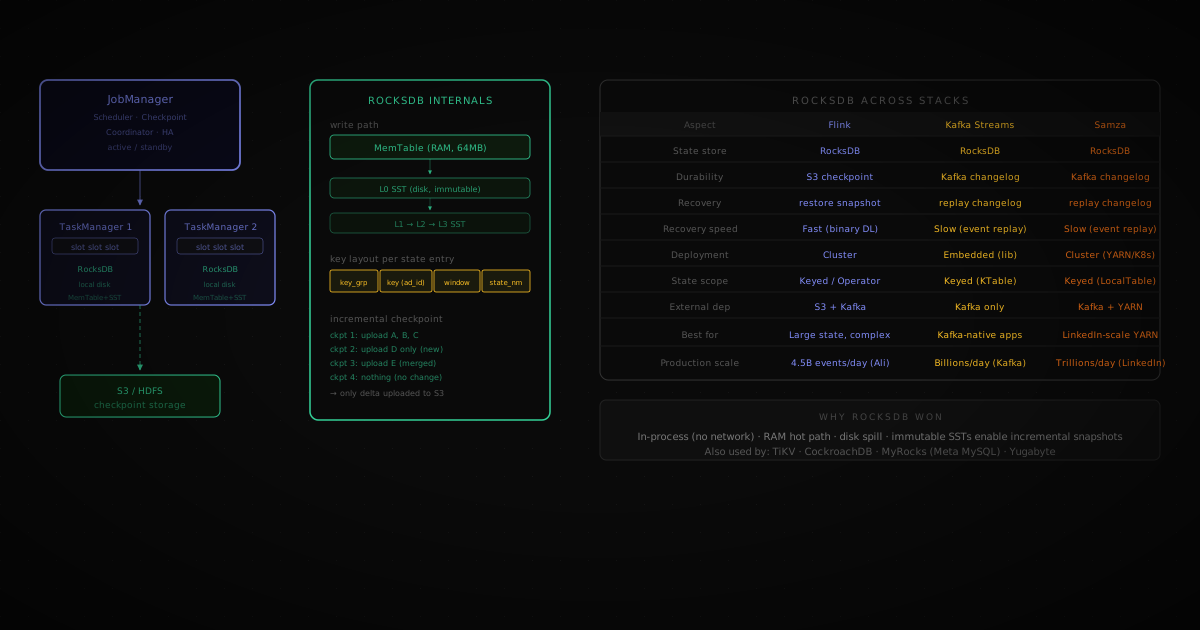
Every incoming click is checked against a memory store (called RocksDB — think of it as a very fast key-value dictionary, like a Python dict but stored on disk so it survives restarts).
- If we've seen this
click_idbefore → throw it away - If we haven't → remember it, pass it on
We keep click_ids in memory for 24 hours. After that, any duplicate arriving that late is astronomically unlikely, and the storage cost of keeping older IDs isn't worth it.
Because Kafka routes all clicks for the same ad_id to the same partition, and each partition is handled by one Flink worker, deduplication is consistent — there's no risk that two workers both see the same click and both decide it's new.
Station 2: Enrichment
The click event from Kafka only contains the ad_id. But to write useful aggregations, we also need the advertiser's ID and the ad format (banner, video, etc.). Flink fetches this from an internal configuration service and attaches it to the event.
This fetch is asynchronous — Flink doesn't freeze while waiting for the lookup. It can process thousands of other clicks while waiting for a response.
Station 3: Counting by Time Window
This is where clicks get counted.
Flink groups clicks into 1-minute buckets. All clicks that happened between 10:00:00 and 10:00:59 go into the 10:00 bucket. At 10:01:00, that bucket closes, and Flink writes a summary row to the database.
This is called a tumbling window — fixed, non-overlapping buckets, like pages in a notebook. Each minute is its own page.
For each 1-minute bucket and each ad, Flink tracks:
- Total click count
- Approximate unique users (using a mathematical trick called HyperLogLog — it gives ±2% accuracy while using far less memory than storing every user ID)
- Click counts broken down by device type (mobile, desktop, tablet)
What about clicks that arrive late?
Flink has a 30-second grace period. If a click's timestamp says it belongs to the 10:00 bucket but it arrives at 10:00:25, it still gets counted in the right bucket. If it arrives more than 30 seconds late, it gets flagged for manual review — not silently dropped.
Component 4: The Analytics Database (ClickHouse)
ClickHouse is a database designed specifically for fast analytical queries. Unlike a regular database that's optimized for reading and writing individual rows (one customer's order, one user's profile), ClickHouse is built for queries like "sum all clicks for this ad across the last 7 days" — aggregations across millions of rows.
Flink writes one row per ad per minute:
The table is organized so that queries for a specific advertiser's ads in a time range are extremely fast — the data is physically sorted on disk in that order.
Pre-computed summaries (Materialized Views)
Querying 1-minute rows when an advertiser asks for a full day of hourly data would mean summing thousands of rows each time. Instead, ClickHouse automatically maintains pre-computed hourly and daily summaries that update as new minute-rows are inserted. A query for "give me daily totals for the past month" reads from the daily summary table instead of millions of minute rows.
The API Advertisers Use
Recording a click (called by the ad SDK in the browser)
The browser sends this in the background the moment you click. The 302 response tells the browser to go to the advertiser's URL. From your perspective, you just clicked a link and went to a website.
Querying metrics (used by the advertiser dashboard)
Response:
The advertiser gets back a time series — one data point per minute — with click counts and device breakdowns. This powers the charts in their dashboard.
What Can Go Wrong (And How We Handle It)
| What breaks | What happens | How we recover |
|---|---|---|
| The Click Collector crashes | Clicks are lost during downtime | Run multiple copies behind a load balancer; if Kafka is temporarily unreachable, buffer clicks on local disk |
| Kafka goes down | Clicks can't be queued | The collector retries automatically with backoff; local disk buffer prevents loss |
| Flink crashes mid-processing | We lose our place in the stream | Flink saves its state to cloud storage every 30 seconds (a checkpoint); on restart it resumes from there, reprocessing from the saved Kafka position |
| Same click arrives twice | Double-counted metrics | The click_id deduplication in Station 1 catches this |
| ClickHouse write fails | Aggregated data lost | Flink retries the write; Kafka still has the raw events as a backup |
| A user's phone clock is wrong | Click assigned to wrong time bucket | We use the client timestamp but validate it's within a reasonable range; Flink's grace period handles minor drift |
What This System Does NOT Handle
It's worth being explicit about scope. This system only counts clicks. These are separate, unrelated systems:
- Which ad to show you — that's ad targeting (a machine learning problem)
- Displaying the ad — that's ad serving (a latency-critical rendering problem)
- Knowing you're the same person on your phone and laptop — that's cross-device tracking (a privacy-sensitive identity problem)
- Whether bots are clicking the ads — that's click fraud detection (a separate Flink pipeline consuming the same raw events, running its own analysis)
Keeping these separate isn't just organizational tidiness. They have different teams, different latency requirements, different data models. Mixing them into one system would make everything harder to maintain and scale.
The Full Flow, In Plain English
- 02You see an ad and click it.
- 04Your browser silently sends a small POST request to the Click Collector.
- 06The Collector responds instantly with "go to this URL" — you're now on the advertiser's site.
- 08In the background, the click event lands in Kafka, waiting to be processed.
- 10Flink picks it up, checks it hasn't been counted before, adds some extra info about the ad, and accumulates it into a 1-minute running total.
- 12At the end of each minute, Flink writes one summary row per ad to ClickHouse.
- 14When the advertiser opens their dashboard and asks "how did my ad perform from 10am to 11am?", the Query API fetches those 60 summary rows from ClickHouse and returns them in under a second.
The total lag from your click to it appearing in the advertiser's dashboard: about 60 seconds.
Further Reading
If you want to go deeper on any of the components:
- Alex Xu — System Design Interview Vol. 2 (chapter on Ad Click Event Aggregation)