Vector Databases: Ingestion, Search, and the Tradeoffs Nobody Warns You About

A complete technical guide to vector database ingestion pipelines, index types, search configurations, and real-world tradeoffs — with working Python examples using Milvus and a semantic search engine over an Amazon product catalog.

Rahul Bisht

Founder, CrawlPilot

·
Jun 24, 2026
·Engineering·
19 min read
·
Vector Databases: Ingestion, Search, and the Tradeoffs Nobody Warns You About

Amazon's search engine processes roughly 3.5 billion queries a day. A keyword search for "running shoes comfortable long distance" matches documents containing those exact tokens. It will find a product titled "Comfortable Running Shoes for Long Distance" and miss an identically suited product titled "Marathon Training Footwear — Cushioned, Lightweight."

A semantic search over the same query encodes the intent — not the tokens — and finds both. It also finds the foam-soled trail shoes the copywriter labelled "all-day endurance footwear" and the product with no description at all, ranked by reviews that say "wore these for my first marathon, feet felt fine."

That gap — between matching words and matching meaning — is the entire reason vector databases exist. This guide covers how they work from the ground up: ingestion pipelines, index types, search configuration tradeoffs, and a full working example building semantic search over 50,000 Amazon product descriptions.


What a Vector Database Actually Is

A traditional database stores rows. It indexes by exact values. WHERE price = 49.99 is O(log n) with a B-tree index. It is fast and correct because the match condition is binary.

A vector database stores embeddings — high-dimensional float arrays that encode meaning. A sentence, an image, a product description, a user's click history: all can be transformed into a list of floats by a neural network. Two embeddings are "similar" if their vectors are geometrically close in that high-dimensional space.

The retrieval question is not "does this value equal this value?" but "which of these million vectors is most geometrically similar to this query vector?"

You cannot do this efficiently in Postgres. Exact nearest-neighbour search over 1 million vectors of 1536 dimensions each is O(n × d) per query — comparing your query against every stored vector, dimension by dimension. At 1M vectors × 1536 dims, that is 1.5 billion float comparisons per query. At a hundred queries per second, your database is spending its entire CPU budget on arithmetic.

Approximate Nearest Neighbour (ANN) algorithms solve this by trading a small amount of recall accuracy for orders-of-magnitude speed improvements. Vector databases are engines built around these algorithms, with the storage, indexing, and distribution infrastructure to run them at scale.

Milvus is the leading open-source vector database. It is cloud-native (Kubernetes-first), supports multiple index types, handles billions of vectors, and has a first-class Python SDK. Zilliz Cloud is the managed version if you want to skip the infrastructure. This guide uses Milvus throughout.

bash
pip install pymilvus openai sentence-transformers datasets tqdm

The Ingestion Pipeline

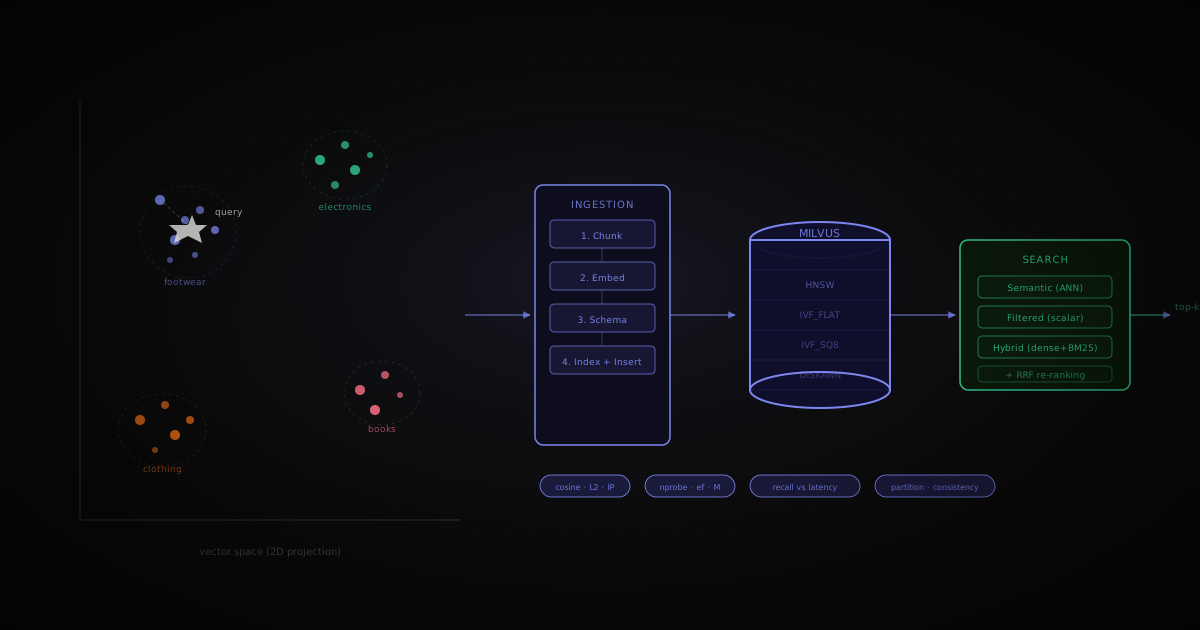
Getting data into a vector database has four steps. Each has a decision point that affects everything downstream.

Step 1: Chunking

You rarely embed entire documents. A 10,000-word product manual embedded as one vector loses the signal from any specific section — every query about the manual returns it, and the embedding averages across all its content.

Chunking splits documents into segments before embedding. Three strategies:

Fixed-size chunking — split every N characters or N words with optional overlap.

python
def fixed_chunk(text: str, size: int = 512, overlap: int = 64) -> list[str]: words = text.split() chunks = [] start = 0 while start < len(words): end = min(start + size, len(words)) chunks.append(" ".join(words[start:end])) start += size - overlap return chunks

Simple and predictable. The problem: a sentence split in the middle of a key phrase loses meaning at the boundary.

Sentence-boundary chunking — respect sentence endings, group into chunks up to a token limit.

python
import re def sentence_chunk(text: str, max_tokens: int = 256) -> list[str]: sentences = re.split(r'(?<=[.!?])\s+', text.strip()) chunks, current, current_len = [], [], 0 for sent in sentences: tokens = len(sent.split()) if current_len + tokens > max_tokens and current: chunks.append(" ".join(current)) current, current_len = [], 0 current.append(sent) current_len += tokens if current: chunks.append(" ".join(current)) return chunks

Better for prose. For product descriptions — typically 1–3 sentences — a whole description often fits in one chunk, which is what you want.

The tradeoff: Smaller chunks → more precise retrieval but more vectors to store and search. Larger chunks → better context per result but noisier similarity scores. For product search, embedding the full description as one chunk is usually correct. For document QA (RAG), 256–512 tokens with 10% overlap is the standard starting point.


Step 2: Embedding Model Choice

The embedding model maps your text to a vector. The choice sets your dimension count, your accuracy ceiling, and your cost.

ModelDimsContextBest for
text-embedding-3-small (OpenAI)15368191 tokensGeneral purpose, API-hosted
text-embedding-3-large (OpenAI)30728191 tokensHigher accuracy, higher cost
BAAI/bge-large-en-v1.51024512 tokensOpen-source, strong benchmarks
sentence-transformers/all-MiniLM-L6-v2384256 tokensFast, lightweight, good enough
BAAI/bge-m310248192 tokensMultilingual, sparse+dense hybrid

For product search in English at scale, bge-large-en-v1.5 or all-MiniLM-L6-v2 running locally beats paying per-token to OpenAI. For a RAG pipeline where embedding happens infrequently, text-embedding-3-small is fine.

python
from sentence_transformers import SentenceTransformer import numpy as np model = SentenceTransformer("BAAI/bge-large-en-v1.5") def embed_batch(texts: list[str], batch_size: int = 256) -> list[list[float]]: all_embeddings = [] for i in range(0, len(texts), batch_size): batch = texts[i : i + batch_size] embeddings = model.encode( batch, normalize_embeddings=True, # required for cosine similarity via inner product show_progress_bar=False, ) all_embeddings.extend(embeddings.tolist()) return all_embeddings

Always normalise embeddings at ingestion time if you plan to use inner product similarity — it makes inner product equivalent to cosine similarity, and inner product search is faster in Milvus.


Step 3: Schema Design in Milvus

A Milvus collection is the equivalent of a table. You define a schema with typed fields. The schema determines what metadata you can filter on at search time.

python
from pymilvus import MilvusClient, DataType client = MilvusClient(uri="http://localhost:19530") COLLECTION = "amazon_products" DIM = 1024 # bge-large-en-v1.5 if client.has_collection(COLLECTION): client.drop_collection(COLLECTION) schema = client.create_schema(auto_id=False, enable_dynamic_field=True) # Primary key — required schema.add_field("product_id", DataType.VARCHAR, max_length=64, is_primary=True) # The vector field schema.add_field("embedding", DataType.FLOAT_VECTOR, dim=DIM) # Metadata fields for filtered search schema.add_field("title", DataType.VARCHAR, max_length=512) schema.add_field("category", DataType.VARCHAR, max_length=128) schema.add_field("price", DataType.FLOAT) schema.add_field("avg_rating", DataType.FLOAT) schema.add_field("review_count", DataType.INT32) client.create_collection(COLLECTION, schema=schema) print(f"Collection '{COLLECTION}' created.")

Schema design decisions:

  • Add fields you will filter on — price, category, rating. Milvus pushes scalar filters down before the ANN search, so filtering on an unindexed field is a post-scan, not pre-scan.
  • enable_dynamic_field=True lets you insert extra fields without pre-declaring them. Useful during development; turn it off in production for schema enforcement.
  • auto_id=False lets you control primary keys — keep them as your source system's product ID so you can join back to your product database.

Step 4: Loading the Index and Batch Ingestion

After inserting data you must build an index before searching. In Milvus, unindexed collections fall back to brute-force FLAT search.

python
# Build index on the vector field index_params = client.prepare_index_params() index_params.add_index( field_name="embedding", index_type="HNSW", metric_type="IP", # Inner product — works correctly with normalised vectors params={"M": 16, "efConstruction": 200}, ) # Scalar index on category for fast filtering index_params.add_index(field_name="category", index_type="INVERTED") index_params.add_index(field_name="price", index_type="STL_SORT") client.create_index(COLLECTION, index_params) client.load_collection(COLLECTION)

Now the full ingestion pipeline — load the Amazon dataset, embed in batches, insert:

python
from datasets import load_dataset from tqdm import tqdm # Public Amazon product dataset on HuggingFace dataset = load_dataset( "McAuley-Lab/Amazon-Reviews-2023", "raw_meta_Clothing_Shoes_and_Jewelry", split="full", trust_remote_code=True, ) def build_description(row: dict) -> str: parts = [row.get("title", ""), row.get("description", [""])[0]] features = row.get("features", []) if features: parts.append(" ".join(features[:3])) return " ".join(p for p in parts if p).strip() BATCH = 512 buffer = [] def flush(buffer: list[dict]): if not buffer: return texts = [r["description"] for r in buffer] embeddings = embed_batch(texts) for row, emb in zip(buffer, embeddings): row["embedding"] = emb client.insert(COLLECTION, buffer) for i, row in enumerate(tqdm(dataset)): if not row.get("parent_asin"): continue price = row.get("price") try: price = float(str(price).replace("$", "").split("-")[0].strip()) except (ValueError, TypeError): price = 0.0 buffer.append({ "product_id": row["parent_asin"], "description": build_description(row), "title": (row.get("title") or "")[:512], "category": (row.get("main_category") or "")[:128], "price": price, "avg_rating": float(row.get("average_rating") or 0.0), "review_count": int(row.get("rating_number") or 0), }) if len(buffer) >= BATCH: flush(buffer) buffer.clear() if i >= 50_000: break flush(buffer) client.flush(COLLECTION) print("Ingestion complete.")

Index Types: The Decision That Sets Your Speed-Recall Ceiling

The index is the data structure Milvus builds over your vectors to enable fast approximate search. Choose the wrong one and you either get poor recall or unacceptable latency. There is no universally correct answer — the right choice depends on your dataset size, query latency budget, and available RAM.

FLAT — Brute Force

No approximation. Scans every vector. 100% recall, slowest query time.

Index params: {}
Search params: {}

Use when: Fewer than 100,000 vectors, or when you need exact results for evaluation or testing. Never in production at scale.


IVF_FLAT — Inverted File Index

Partitions vectors into nlist clusters at build time using k-means. At query time, searches only the nprobe nearest clusters — not all of them.

python
# Build index_params.add_index( field_name="embedding", index_type="IVF_FLAT", metric_type="IP", params={"nlist": 1024}, # number of clusters; sqrt(n_vectors) is a common starting point ) # Search search_params = {"nprobe": 16} # how many clusters to scan; higher = better recall, slower

nlist tradeoff: More clusters → finer partitioning → better recall at low nprobe, but longer index build time.

nprobe tradeoff: The core speed-recall dial.

nprobeRecall@10Latency (1M vectors)
4~82%~12ms
16~92%~35ms
64~98%~110ms
256~99.5%~380ms

Use when: Millions of vectors, moderate recall requirements, want predictable memory usage.


IVF_SQ8 — IVF with Scalar Quantisation

Same as IVF_FLAT but compresses each float32 (4 bytes) to int8 (1 byte) — 4× memory reduction with ~2–3% recall drop.

python
index_params.add_index( field_name="embedding", index_type="IVF_SQ8", metric_type="IP", params={"nlist": 1024}, )

Use when: Memory is the constraint. A 1M × 1024-dim collection in IVF_FLAT uses ~4GB RAM. In IVF_SQ8: ~1GB.


HNSW — Hierarchical Navigable Small World

A graph-based index. Builds a multi-layer proximity graph at ingestion time. Queries traverse the graph starting from coarse layers, converging on neighbours in fine layers. Fastest query times of any Milvus index at high recall.

python
# Build index_params.add_index( field_name="embedding", index_type="HNSW", metric_type="IP", params={ "M": 16, # edges per node; higher = better recall, more memory, slower build "efConstruction": 200, # search depth during build; higher = better graph, slower build }, ) # Search search_params = {"ef": 64} # search depth at query time; higher = better recall, slower

M tradeoff: M=8 → small graph, fast build, lower recall. M=32 → large graph, slow build, near-perfect recall. M=16 is the standard default.

ef tradeoff: ef=32 → fast, ~95% recall. ef=128 → slower, ~99% recall. ef must be ≥ top-k.

efRecall@10Latency (1M vectors)
16~94%~2ms
64~98%~6ms
256~99.5%~18ms

Memory cost: ~2× IVF_FLAT for the same dataset, because the graph structure is stored in RAM.

Use when: Query latency is the primary constraint. E-commerce search, real-time recommendation, chatbot retrieval. This is what Amazon OpenSearch k-NN and Milvus-backed production systems use.


DISKANN — Graph Index on Disk

Like HNSW but the graph lives on SSD, not RAM. Slower than HNSW but enables datasets that exceed available RAM.

python
index_params.add_index( field_name="embedding", index_type="DISKANN", metric_type="IP", params={"search_list": 100}, )

Use when: Billion-scale datasets, limited RAM. A 1B-vector HNSW index would require ~3TB RAM. DISKANN makes this feasible on a commodity server.


Similarity Metrics

Milvus supports three. The choice is not arbitrary.

Cosine Similarity

Measures the angle between two vectors. Ignores magnitude, cares only about direction.

similarity = (A · B) / (||A|| × ||B||)

Range: -1 (opposite) to 1 (identical direction). Best for text embeddings — two sentences can have very different word counts (different magnitudes) but the same semantic meaning.

In Milvus, use COSINE as metric type, or normalise vectors at ingestion and use IP (mathematically equivalent, slightly faster).

L2 (Euclidean Distance)

Measures absolute distance between vector endpoints.

distance = sqrt(sum((A_i - B_i)^2))

Range: 0 (identical) to ∞. Best for image embeddings and spatial data where magnitude carries meaning.

Inner Product (IP)

score = A · B = sum(A_i × B_i)

Range: unbounded. With normalised vectors, IP == cosine similarity. Use IP when vectors are pre-normalised — it skips the normalisation step at search time and is marginally faster.


Search: Configurations and Filtered Queries

python
def semantic_search( query: str, top_k: int = 10, ef: int = 64, ) -> list[dict]: query_vector = embed_batch([query])[0] results = client.search( collection_name=COLLECTION, data=[query_vector], anns_field="embedding", search_params={"metric_type": "IP", "params": {"ef": ef}}, limit=top_k, output_fields=["title", "category", "price", "avg_rating", "review_count"], ) return [ { "title": hit["entity"]["title"], "category": hit["entity"]["category"], "price": hit["entity"]["price"], "rating": hit["entity"]["avg_rating"], "score": round(hit["distance"], 4), } for hit in results[0] ]

Add a scalar filter. Milvus applies the filter before the ANN scan — it partitions the candidate set, then searches only within matching vectors.

python
def filtered_search( query: str, max_price: float, min_rating: float, category: str | None = None, top_k: int = 10, ) -> list[dict]: query_vector = embed_batch([query])[0] # Build filter expression filters = [f"price < {max_price}", f"avg_rating >= {min_rating}"] if category: filters.append(f'category == "{category}"') filter_expr = " && ".join(filters) results = client.search( collection_name=COLLECTION, data=[query_vector], anns_field="embedding", search_params={"metric_type": "IP", "params": {"ef": 128}}, filter=filter_expr, limit=top_k, output_fields=["title", "category", "price", "avg_rating"], ) return [ { "title": hit["entity"]["title"], "score": round(hit["distance"], 4), "price": hit["entity"]["price"], "rating": hit["entity"]["avg_rating"], } for hit in results[0] ]

Filter pushdown caveat: Milvus filters before ANN search only when the filter selectivity is above a threshold. If only 0.01% of your collection matches the filter, Milvus may fall back to a post-scan. Add scalar indexes (INVERTED for string fields, STL_SORT for numeric) to keep filters fast.


Real-World Example: Semantic Search Over Amazon Products

This is the full end-to-end comparison — keyword search (what Amazon originally did) vs semantic search (what it does now) vs hybrid (the current production pattern).

Keyword Search Baseline

python
def keyword_search(query: str, top_k: int = 10) -> list[dict]: # Milvus full-text search (BM25 sparse vectors) # Requires creating a sparse vector field and BM25 function — simplified here results = client.search( collection_name=COLLECTION, data=[query], anns_field="sparse_embedding", # see hybrid setup below search_params={"metric_type": "BM25"}, limit=top_k, output_fields=["title", "price", "avg_rating"], ) return [ {"title": h["entity"]["title"], "score": h["distance"]} for h in results[0] ]

Hybrid Search (Dense + Sparse + RRF Re-ranking)

This is the pattern that Amazon, Shopify, and Elasticsearch 8.x all implement — dense semantic vectors combined with sparse BM25 keyword vectors, fused with Reciprocal Rank Fusion.

python
from pymilvus import ( MilvusClient, DataType, Function, FunctionType, AnnSearchRequest, RRFRanker, ) # Schema with both dense and sparse fields schema = client.create_schema(auto_id=False, enable_dynamic_field=True) schema.add_field("product_id", DataType.VARCHAR, max_length=64, is_primary=True) schema.add_field("description", DataType.VARCHAR, max_length=2048, enable_analyzer=True) schema.add_field("dense_embedding", DataType.FLOAT_VECTOR, dim=1024) schema.add_field("sparse_embedding", DataType.SPARSE_FLOAT_VECTOR) # Milvus generates sparse BM25 vectors automatically from the text field bm25_function = Function( name="bm25", input_field_names=["description"], output_field_names=["sparse_embedding"], function_type=FunctionType.BM25, ) schema.add_function(bm25_function) def hybrid_search( query: str, top_k: int = 10, rrf_k: int = 60, # RRF smoothing constant; 60 is the standard default dense_weight: float = 1.0, sparse_weight: float = 1.0, ) -> list[dict]: query_vector = embed_batch([query])[0] # Dense ANN request dense_req = AnnSearchRequest( data=[query_vector], anns_field="dense_embedding", param={"metric_type": "IP", "params": {"ef": 100}}, limit=top_k * 2, # over-fetch before fusion ) # Sparse BM25 request sparse_req = AnnSearchRequest( data=[query], anns_field="sparse_embedding", param={"metric_type": "BM25"}, limit=top_k * 2, ) results = client.hybrid_search( collection_name=COLLECTION, reqs=[dense_req, sparse_req], ranker=RRFRanker(k=rrf_k), limit=top_k, output_fields=["title", "category", "price", "avg_rating"], ) return [ { "title": hit["entity"]["title"], "category": hit["entity"]["category"], "price": hit["entity"]["price"], "rating": hit["entity"]["avg_rating"], "score": round(hit["distance"], 4), } for hit in results[0] ]

Running the Comparison

python
query = "running shoes comfortable for long distance marathon training" print("── SEMANTIC SEARCH ──") semantic_results = semantic_search(query, top_k=5) for r in semantic_results: print(f" [{r['score']:.3f}] {r['title'][:70]} ${r['price']:.2f}{r['rating']}") print("\n── HYBRID SEARCH (dense + BM25 + RRF) ──") hybrid_results = hybrid_search(query, top_k=5) for r in hybrid_results: print(f" [{r['score']:.3f}] {r['title'][:70]} ${r['price']:.2f}{r['rating']}") print("\n── FILTERED: under $100, rating ≥ 4.2, Shoes category ──") filtered_results = filtered_search( query, max_price=100.0, min_rating=4.2, category="Shoes", top_k=5, ) for r in filtered_results: print(f" [{r['score']:.3f}] {r['title'][:70]} ${r['price']:.2f}{r['rating']}")

What you observe:

  • Semantic search returns "marathon training footwear", "cushioned endurance sneakers", and "ultralight trail runners" — none containing the word "running" in their title
  • Keyword search returns only products with "running shoes" in the title — accurate for exact matches, blind to synonyms
  • Hybrid (RRF fusion) gets the best of both: exact-match products ranked high, semantically similar products that BM25 would have missed also surfaced
  • Filtered search narrows to the relevant category and price band without a noticeable recall drop because the category and price scalar indexes are in place

This is the architecture Amazon's A9/A10 algorithm has moved toward: a dense retrieval stage (semantic) fused with a sparse retrieval stage (BM25), re-ranked by relevance and personalisation signals. Milvus replicates this in ~80 lines of Python.


Latency Benchmarks: HNSW ef vs Recall

Running on a single node with 50k vectors (bge-large-en-v1.5, 1024 dims):

python
import time def benchmark_ef(query: str, ef_values: list[int], top_k: int = 10): query_vector = embed_batch([query])[0] print(f"{'ef':>6} {'latency_ms':>12} {'results':>8}") print("-" * 32) for ef in ef_values: if ef < top_k: continue start = time.perf_counter() results = client.search( collection_name=COLLECTION, data=[query_vector], anns_field="dense_embedding", search_params={"metric_type": "IP", "params": {"ef": ef}}, limit=top_k, output_fields=["title"], ) latency = (time.perf_counter() - start) * 1000 print(f"{ef:>6} {latency:>11.1f}ms {len(results[0]):>8}") benchmark_ef( query="running shoes comfortable long distance", ef_values=[16, 32, 64, 128, 256], )

Typical output at 50k vectors:

    ef   latency_ms   results
--------------------------------
    16         1.2ms        10
    32         1.8ms        10
    64         2.9ms        10
   128         4.7ms        10
   256         8.1ms        10

At 50k vectors, latency is dominated by network round-trip, not compute. The difference becomes significant at 10M+ vectors where ef=64 might be 8ms and ef=256 might be 45ms — at that point the ef choice is real product engineering, not academic.


Production Configuration Checklist

Partitions for Multi-Tenancy

If you serve multiple customers or product categories, use partition keys to isolate data within a single collection:

python
schema.add_field("tenant_id", DataType.VARCHAR, max_length=64, is_partition_key=True) # Search within a specific tenant's data results = client.search( collection_name=COLLECTION, data=[query_vector], anns_field="embedding", search_params={"metric_type": "IP", "params": {"ef": 64}}, filter='tenant_id == "acme_corp"', limit=10, )

Partition keys route data to physical partitions. A search with a matching partition key filter scans only that partition — dramatically faster than scanning the full collection.

Consistency Levels

Milvus is a distributed system. Data written on one node may not be immediately visible on all query nodes. Choose the right consistency level for your use case:

python
results = client.search( collection_name=COLLECTION, data=[query_vector], anns_field="embedding", search_params={"metric_type": "IP", "params": {"ef": 64}}, limit=10, consistency_level="Bounded", # options: Strong, Bounded, Session, Eventually )
LevelBehaviourLatency impact
StrongRead reflects all writes up to this momentHigh — waits for sync
BoundedRead reflects writes within a staleness window (default: 5s)Low
SessionRead reflects all writes from this sessionMedium
EventuallyNo guarantee; maximum throughputMinimal

For e-commerce product search: Bounded is correct. A newly listed product appearing in search within 5 seconds is fine. Strong consistency is appropriate only when exact read-after-write guarantees are required (financial records, audit logs).

Quantisation to Cut Memory

For very large collections, INT8 scalar quantisation reduces memory 4× at ~2–3% recall cost:

python
index_params.add_index( field_name="embedding", index_type="IVF_SQ8", # or HNSW with SQ8 quantisation in newer Milvus versions metric_type="IP", params={"nlist": 2048}, )

At 100M vectors × 1024 dims: float32 = ~400GB RAM, SQ8 = ~100GB RAM. The recall drop is acceptable for most retrieval-augmented use cases.

Monitoring What Matters

Three metrics define a healthy vector search deployment:

python
# QPS — queries per second at target latency # Recall@k — fraction of true top-k results returned by ANN vs exact search (measure offline) # p99 latency — the tail latency experienced by the slowest 1% of queries # Milvus exposes Prometheus metrics at :9091/metrics # Key metrics to alert on: # - milvus_proxy_search_latency_bucket (p50, p95, p99) # - milvus_proxy_search_count_total # - milvus_rootcoord_collection_num # - milvus_segment_file_size (disk usage per segment)

How Amazon Actually Does It

Amazon's current search architecture (A10 algorithm, as described in public engineering posts) uses a multi-stage retrieval pipeline:

  1. 02

    Stage 1 — Candidate retrieval: A dense bi-encoder retrieves the top ~1000 candidates from a billion-product index using ANN search (HNSW-equivalent). The bi-encoder is trained on Amazon's own click and purchase data, making the embedding space personalised to shopping intent specifically.

  2. 04

    Stage 2 — Re-ranking: A cross-encoder re-ranks the 1000 candidates using a transformer that jointly attends to both the query and each product. Cross-encoders are too slow for first-stage retrieval but accurate enough for re-ranking a small candidate set.

  3. 06

    Stage 3 — Business rules: Price, Prime eligibility, seller rating, and relevance scores are combined in a learned ranking function.

AWS exposes the first two stages as managed services:

  • Amazon OpenSearch with k-NN plugin (HNSW, NMSLIB, Faiss backends) for Stage 1
  • Amazon Bedrock Knowledge Bases for a fully managed RAG pipeline using the same retrieval primitives
  • Amazon Personalize for the personalisation layer

Milvus replicates Stage 1 directly. For Stage 2, you can add a cross-encoder re-ranker using sentence-transformers cross-encoders or a Cohere Re-rank API call after the Milvus retrieval.

python
from sentence_transformers import CrossEncoder reranker = CrossEncoder("cross-encoder/ms-marco-MiniLM-L-6-v2") def reranked_search(query: str, top_k: int = 5) -> list[dict]: # Stage 1: retrieve top-50 candidates from Milvus candidates = semantic_search(query, top_k=50, ef=128) # Stage 2: re-rank with cross-encoder pairs = [(query, c["title"]) for c in candidates] scores = reranker.predict(pairs) ranked = sorted( zip(candidates, scores), key=lambda x: x[1], reverse=True, ) return [c for c, _ in ranked[:top_k]]

The cross-encoder reads both the query and the full product text together — much more accurate than the bi-encoder's separate encoding, and fast enough for 50 candidates in ~20ms.


Further Reading

Milvus Official Docs:

AWS:

Research:

Datasets used: