InstaInsights: An Instagram Planner and Competitor Tracker That Never Leaves Your Browser
What InstaInsights does for creators and social teams: a content planner, a weekly growth coach, fair account audits, breakout detection and a brand-deal pipeline, all in a free Chrome extension with no login and no backend.

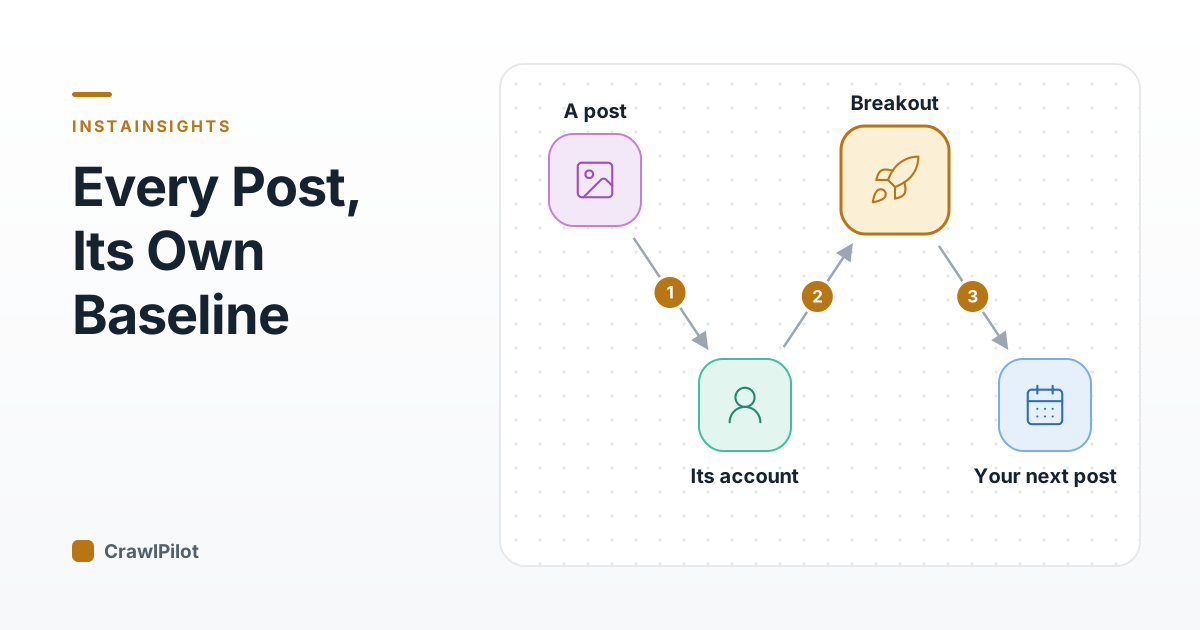
A competitor's reel hits 400,000 views. Yours, posted the same week, got 9,000. The natural reaction is to copy their format, their hook, maybe their posting time. Often that's the wrong lesson: if that account usually gets 500,000 views, the reel was a dud for them, and your 9,000 might be three times your normal. Raw counts on Instagram tell you who is big, not what worked.
InstaInsights is a free Chrome extension from the CrawlPilot team built around that one correction: every number is compared with the right baseline before it's shown to you. Around that sits a planner for your own posts, a weekly coach, and a pipeline for brand deals. It all runs in your browser, with no account to create and nothing uploaded.
The numbers in this post are illustrative examples, not measurements from real accounts.
Why Raw Numbers Mislead on Instagram
Three habits make Instagram numbers hard to read:
- Comparing accounts of different sizes. A 2% engagement rate is weak for an account with 5,000 followers and strong for one with 2 million. Engagement rate naturally falls as audiences grow.
- Comparing posts across accounts. A post is only a hit relative to what that account normally gets.
- Reading likes alone. Bought followers, engagement pods and giveaways inflate likes in patterns you can spot (strange likes-per-comment ratios, sudden follower jumps followed by purges) only if you look for them.
Most analytics tools show the raw counts and leave the interpretation to you. InstaInsights does the comparison first.
Measuring Against the Right Baseline
Breakout detection scores each post against its own account's median. A post at "5.1×" did five times what that account's typical post does, whether the account has 3,000 followers or 3 million. Breakouts from accounts you track show up on your Home page as Ideas to remix, which is a far better source of what's working right now than the most-viewed list.
The account audit gives an A–F grade built from signals that each explain themselves:
| Signal | What it catches |
|---|---|
| Engagement rate vs. accounts of the same size | Audiences that don't actually engage |
| Likes per comment | Like-heavy patterns typical of pods or bought likes |
| Follower spikes and purges | Bought followers and the clean-ups that follow |
| Reel views per follower | Reach beyond the existing audience |
| Posting consistency | Accounts that post in bursts and go quiet |
| Sponsored share | How much of the feed is paid |
The grade is useful in two directions: checking a competitor before you copy them, and checking a creator before a brand pays them.
Compare puts groups of accounts side by side (followers, growth, engagement rate, posts per week, share of engagement, audit grade) over 7, 30 or 90 days. Research covers hashtags (usage, top posts, volume over time), the brands behind paid-partnership and #ad posts, and who mentions or tags an account. Only real disclosures count as brand deals, so a collab between friends doesn't show up as a sponsorship.
From Insight to the Next Post
Knowing what works is only useful if it changes what you post. The planner closes that loop:
The pieces of that loop:
- Idea bank and board. Save any post as an idea with the 💡 button on Instagram, then move it through Ideas → Drafting → Ready → Scheduled → Posted.
- Post editor. Caption with Instagram's limits (2,200 characters, 30 hashtags), reusable hashtag sets, first comment and a checklist.
- Suggested posting times. Drawn from when your posts do best, with common good times until you have enough history.
- Calendar and grid preview. Drag ideas onto days, and see how your profile grid will look with the planned posts in front.
- Themes. Define content pillars and see which ones your audience responds to.
- Post from your phone. Every planned post has a QR code of its caption and hashtags, and the schedule exports as an .ics calendar file.
Home ties it together each week: posting streak, follower pace with the date you'll reach your next milestone, consistency over eight weeks, and a review with up to five tips backed by your own numbers. A tip like "your carousels outperform your reels" can be added to the planner in one click. Home also lists comments worth replying to (questions first, generic ones skipped) and your superfans, the people who comment on post after post.
Turning Reach Into Deals
For creators who work with brands, Deals is a small CRM. A deal moves from Lead → Pitched → Negotiating → Contracted → Content due → Posted → Paid, with a fee, due date, usage rights and follow-up warnings. Deliverables go straight into the planner. Earnings show what's been paid this month and year, what's owed, and your win rate.
Two exports matter here. The media kit is generated from your own numbers, with a rate card and a brand-ready score that lists what to improve first. The campaign report shows how the posts you made for a brand performed. Both are single HTML files you can email, so no one needs an account to open them.
Where the Data Lives, and Why There's No Login
Many Instagram tools ask you to connect your account through a login or a business API, then keep your data on their servers. InstaInsights does neither. It reads the data Instagram has already sent to your browser as you browse, and stores it in your browser's own database.
That choice has consequences, in both directions:
- Nothing to leak or lose. There's no server holding your competitors list, your deal fees or your drafts. CSV export, JSON backup and restore cover moving to a new machine.
- Accounts update as you visit them. An optional refresh keeps tracked accounts current, but deliberately gently: at most every 8 hours, only while an Instagram tab is open, a few seconds between accounts, and backing off when Instagram rate-limits.
- Teams can lock it down. Through Chrome's managed extension policy, admins can turn off downloads, switch to a passive mode that never calls Instagram itself, turn off background refresh, or prune history after a set number of days.
What It Won't Do
InstaInsights never posts, likes, follows or comments for you, and it can only see what your own browser already received from Instagram. If you want a tool that automates activity on Instagram, this isn't it, and that's on purpose.
It's also not a scraper for bulk data across thousands of accounts. For collecting structured data from websites at scale, that's what CrawlPilot is for.
Getting Set Up in Four Steps
- 01Add InstaInsights to Chrome from the Web Store.
- 02Open Instagram. The setup recognises your account from Instagram's menu, so there's nothing to type.
- 03Pick a few accounts to watch: competitors, peers, or accounts you admire.
- 04Set a goal and choose whether to turn on refresh and reminders.
From there, browse Instagram as usual. The dock in the corner shows each account's grade and growth as you go, and Home fills in as the week's posts come in.

