Design a Price Monitoring System: Spending a Freshness Budget, Not Crawling Everything
A system design walkthrough for tracking competitor prices across millions of product pages: why it isn't a web crawler, adaptive re-check intervals that spend fetches where prices move, a cheapest-first fetch ladder, structured-data extraction with sanity checks, product matching, change-point storage and alerting, with a proxy-cost calculator.

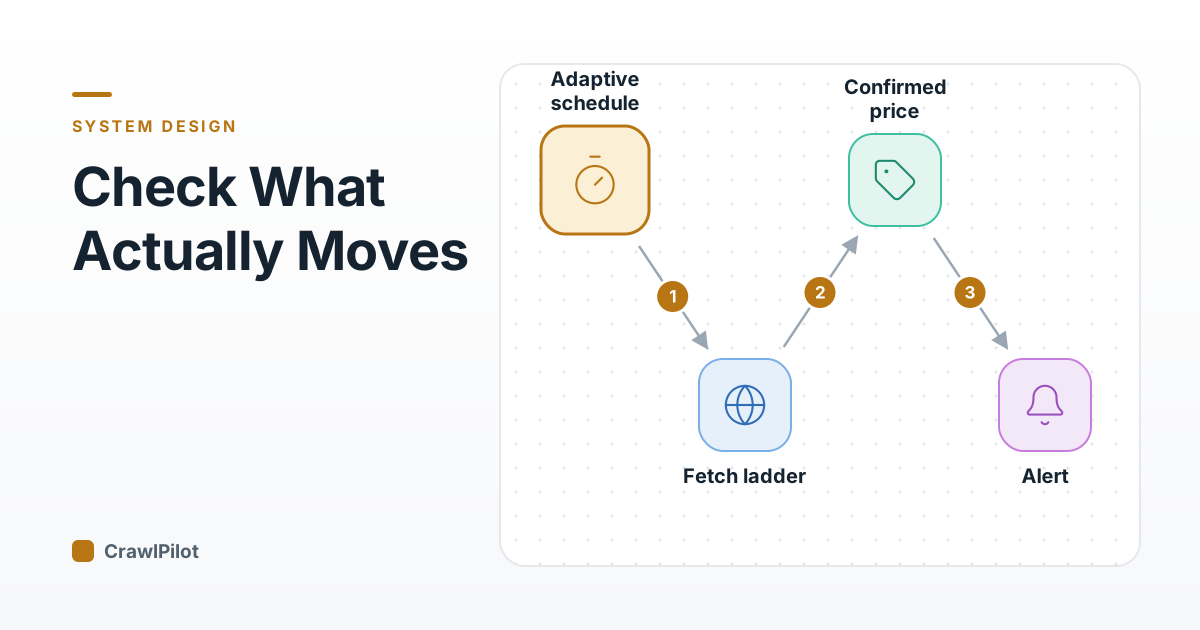
If you've read the web crawler design, a price monitoring system will look familiar: a frontier of URLs, politeness per domain, fetchers, parsers, storage. Most of the boxes are the same. The objective is not. A crawler measures success in coverage: how much of the web did you find? A price tracker's URL list is mostly fixed (the products you care about), and success is freshness: how long between a retailer changing a price and you knowing about it?
That single difference flips most of the design decisions. A crawler spends its budget on new URLs. A price tracker spends its budget re-fetching the same URLs, and the whole game is deciding which ones, how often, and how cheaply.
The Job, in Numbers
Competitive price intelligence for a retailer or brand. Working requirements (illustrative numbers):
- 20 million product URLs across about 500 competitor and marketplace sites.
- Freshness by tier: the top 1% of products (best-sellers, price-sensitive categories) within 15 minutes; the next 20% within a few hours; the long tail daily.
- Accurate: a wrong price is worse than a late one, because someone may reprice against it.
- History: every observed price change kept for analytics and audit.
- Polite and lawful: respect robots.txt and per-site rate limits, and only collect public product data. The web data and the law posts cover the legal side; this one covers the system.
The Naive Design: Check Everything Every Hour
The first version is a cron job that loops over every URL every hour. Do the arithmetic: 20 million fetches an hour is about 5,600 a second, around the clock. Most of them return the same price as last time, because most products don't change price most hours. You're paying proxies, compute and the retailer's patience to learn nothing, and you're still an hour late on the products that matter.
Worse, a fixed schedule is easy to spot. Five hundred requests a minute to one retailer, every minute, from the same few networks, is exactly the pattern anti-bot systems are built to catch. The anti-bot detection post goes into how.
The fix is to stop thinking in schedules and start thinking in a budget.
The Freshness Budget
You can afford some number of fetches a day, set by proxy spend, compute and per-site politeness limits. Call it the budget. The scheduler's job is to spend it where it buys the most freshness.
Each URL gets a next_check time computed from three things:
- 01How often its price has actually changed. Track it per URL. When a fetch finds a change, shorten the interval (halve it, say). When it finds no change, lengthen it (multiply by 1.5). Keep it between a floor and a ceiling per tier.
- 02How much it matters. A business priority multiplier: best-sellers and items you're actively repricing check more often.
- 03What's happening. On known sale events (a retailer's big sale day, a holiday weekend), temporarily lower every interval for that retailer.
Then the per-domain budget caps the total. If a retailer's politeness limit is 2 requests a second, that's about 170,000 fetches a day for that domain, no matter how many of its URLs are due. When demand exceeds the cap, the most overdue, highest-priority URLs go first.
- A fetch extracts the current price and compares it with the last one stored for this URL.
- If it changed, the interval halves, down to the tier's floor. A product in an active price war ends up checked every 15 minutes.
- If it didn't change, the interval grows by half, up to the ceiling. A product whose price hasn't moved in a month drifts to daily checks.
- Either way the URL goes back in the queue with a new next_check. The per-domain budget decides what actually gets fetched when more URLs are due than the site's limit allows.
4 steps. Press Play to walk through them, or click any part of the diagram.
The effect is large. Most catalogues have a small share of products whose prices move often and a long tail that rarely moves. An adaptive scheduler concentrates fetches on the first group automatically, without anyone hand-tuning tiers. The scheduling machinery itself (leases, shards, due-time polling) is the same as in the job scheduler design; here every URL is a schedule whose interval rewrites itself.
next_check. It costs nothing in freshness, and it stops your requests to each site from arriving on a beat that is easy to fingerprint.The Fetch Ladder: Cheapest Method That Works
Fetching a product page can cost a thousand times more one way than another. A plain HTTP request through a datacenter proxy is cheap. A full headless browser through a residential proxy is much more expensive in bandwidth and in CPU. So each site gets a ladder, and fetchers start at the bottom rung that's known to work for it:
| Rung | Method | When it's enough |
|---|---|---|
| 1 | Retailer feed, sitemap with lastmod, or public API | The site publishes product data you're allowed to use |
| 2 | Plain HTTP GET, conditional where possible | Server-rendered pages; If-None-Match or If-Modified-Since can skip unchanged pages entirely (RFC 9110) |
| 3 | HTTP GET of the site's own JSON endpoint | The page loads its price from an API call you can see |
| 4 | Headless browser | The price only exists after JavaScript runs |
| 5 | Headless browser on residential or mobile routes | The site blocks datacenter traffic |
Each site's rung is learned, not configured once: if rung 2 starts returning challenge pages, the site moves up a rung for a while, and periodically the system tries stepping back down. The proxy industry post explains why the upper rungs cost what they do.
Proxy bandwidth is usually the biggest line item, and it scales with fetches, page size and success rate. Try your own numbers:
At this spend, a data aggregator, an official API (Amazon SP-API, $0 for approved use), or a smaller high-value subset of pages usually beats raw proxy bandwidth.
Proxy bandwidth only: not compute, vendor minimums, or the extra parsing retries cost. Billed in decimal GB (1 GB = 1,000,000 KB), the way vendors meter it. Per-GB prices vary by vendor and are illustrative, not a quote: roughly $0.50–2 datacenter, $3–15 residential, $2–8 ISP, $15–50 mobile.
Notice what moves the total most. Halving the number of fetches (better scheduling) halves the bill. Raising the success rate cuts retries. Fetching a 20 KB JSON endpoint instead of a 350 KB HTML page is a 17-fold saving on that site.
Extracting the Right Number
Getting a page is half the problem. A product page has many numbers on it: the price, the crossed-out list price, the per-unit price, a bundle price, the price of a recommended product, a shipping cost. Extracting the wrong one is the commonest source of bad data.
Extract in order of reliability:
- 01Structured data. Many retailers embed schema.org
ProductandOffermarkup as JSON-LD, withprice,priceCurrencyandavailability, because Google uses it for product rich results. When it's present, it's the retailer's own statement of the price, in a fixed format. - 02Per-site selectors. For sites without structured data, maintained CSS or XPath selectors. They break on redesigns; monitor extraction failure rates per site.
- 03An LLM extractor for the long tail of small sites, given the page and a schema. It costs more per page and needs the same validation. The selectors versus LLMs post works through when that trade pays off.
Then validate every extracted price before it's stored:
- Currency and unit match what's expected for that site and product.
- Plausibility against history: a change of more than a set percentage (50% is a reasonable start) is held, not published.
- Confirmation refetch: a held price is refetched, ideally via a different route, a few minutes later. Two independent observations of a big drop are a real drop. One is often a glitch, a test page or a wrong selector.
- Availability is a separate field. "Out of stock" isn't a price of zero.
Matching Their Product to Yours
A competitor's price is useless until you know which of your products it corresponds to. Matching is its own subsystem, and it runs when a URL is added and periodically after, not on every fetch.
- If the page exposes a GTIN, UPC, EAN or manufacturer part number that matches one of yours, the match is exact. Prefer this whenever it's available.
- Otherwise, search your catalog for candidates using text embeddings of the normalised title and image embeddings of the main photo.
- Score each candidate on brand, title similarity, image similarity and key attributes. Attributes act as hard checks: a 500 ml bottle is not a 1 l bottle, and a 3-pack is not a single, however similar the titles.
- Auto-accept only high scores. Send the uncertain middle to human review, and feed reviewers' decisions back as training data for the scorer.
4 steps. Press Play to walk through them, or click any part of the diagram.
The embedding and vector search part is the same machinery as the vector database post. The part people underestimate is the attribute checks. Most bad matches I'd expect to see are near-identical products that differ in size or pack count, and those produce price comparisons that look like huge undercuts.
Storing Prices as Change Points
Store every observation, briefly; store history as change points.
- Observations (URL, time, extracted price, availability, fetch method, raw page reference) go to cheap append-only storage with a short retention. They're for debugging extraction.
- Price history stores a row only when something changes:
(product, competitor, price, currency, availability, valid_from, valid_to). A product checked every 15 minutes for a year whose price changed 12 times is 12 rows, not 35,000. - Current price per (product, competitor) lives in a fast key-value store for dashboards and repricing.
Each confirmed change emits an event. Alert rules subscribe to events, not to the database: "competitor undercut us by more than 5% on a top-1,000 product", "minimum advertised price violated by a reseller", "competitor went out of stock on an item we have". Because alerts fire only on validated, confirmed changes, a broken selector produces a dip in extraction success, not a flood of false undercuts.
The Assembled System
Test Yourself
Q1What's the main difference between a web crawler and a price tracker?
Q2A product's price hasn't changed in its last ten checks. What should the scheduler do?
Q3An extracted price is 70% below yesterday's. What happens before an alert fires?
Scheduling
- Budget, not schedule: fetches per day per domain are fixed.
- Interval halves on change, grows ×1.5 without, within tier bounds.
- Priority multipliers, sale-event overrides, and jitter.
Fetching
- Cheapest rung first: feed, conditional GET, JSON endpoint, browser, residential.
- Learn each site's rung; try stepping down periodically.
- Respect robots.txt and per-site rate limits.
Data quality
- JSON-LD Offer first, then selectors, then an LLM extractor.
- Check currency, unit and history; refetch to confirm big moves.
- Match by GTIN/MPN first; attributes are hard checks.
Storage and alerts
- Short-lived raw observations; history as change points.
- Alerts on confirmed change events, not on raw fetches.
Sources
- IETF, RFC 9110: HTTP Semantics (conditional requests)
- schema.org, Offer
- Google Search Central, Product structured data
Related posts
More in System Design →
Design Search Autocomplete: A 100 ms Budget, Every Keystroke
Dec 11, 2026
Design a Payment System: Idempotency Keys, a Double-Entry Ledger and the Timeout You Can't Trust
Dec 8, 2026
Design a Distributed Job Scheduler: Leases, Fencing Tokens and the Missed Tick
Nov 30, 2026
Design a Config Rollout System That Can't Take Down Your Whole Fleet
Nov 21, 2026