Chrome Extension · v3.1

Turn any web page
into a spreadsheet

Click one item. CrawlPilot finds the rest, follows pagination and exports to Excel, CSV or Google Sheets. Free, runs in your browser, no account.

01

Open any website

Navigate to the page you want to scrape. Works on any public site.

02

Click elements

Select what you want. AI detects repeating structures automatically.

03

Export instantly

Download structured data as CSV or JSON directly from your browser.

Capabilities

Every tool, one side panel

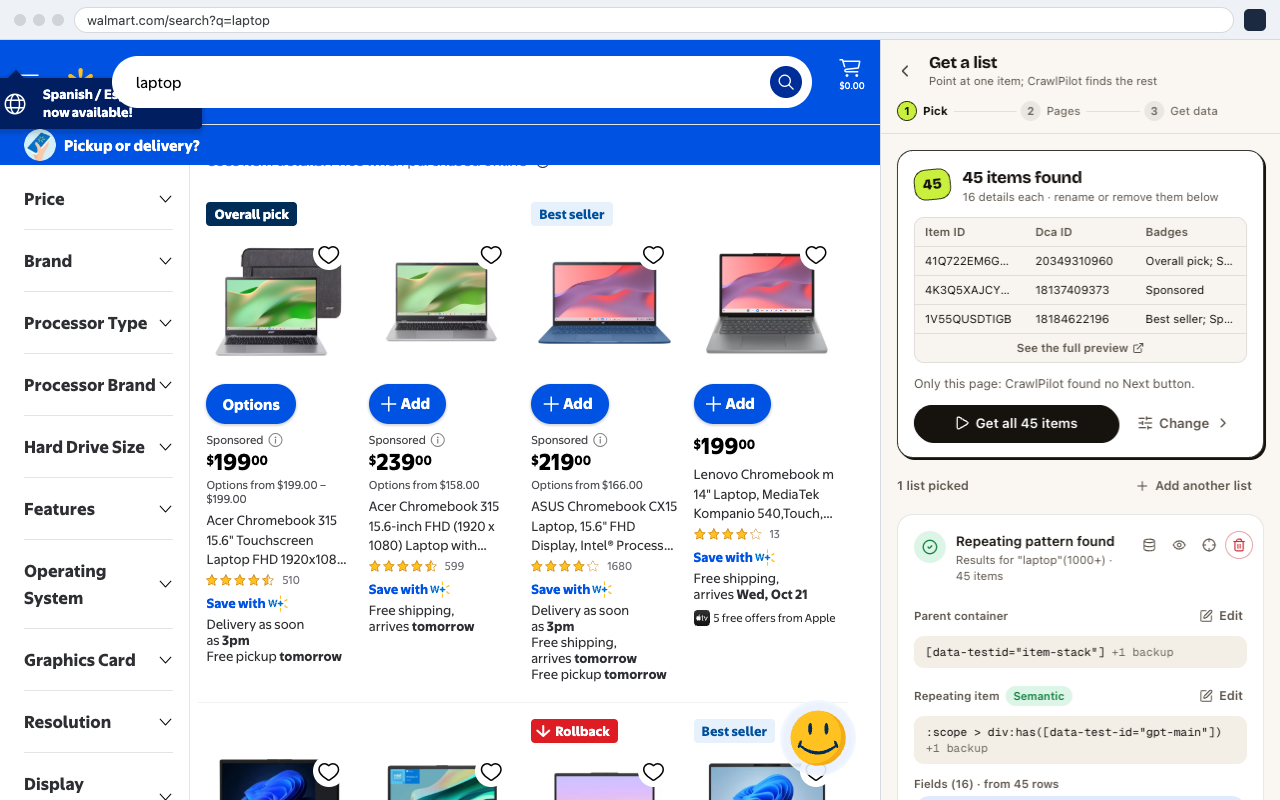
A list in two clicks

Point at one product, job or result. CrawlPilot finds every item like it, types the fields (prices, ratings, review counts) and follows the Next link to more pages.

CrawlPilot showing 45 items found on a Walmart search, with a preview table and a Get all 45 items button

No servers required

Runs entirely in your browser session. No cloud infrastructure to manage or pay for.

Your data stays local

Extracted data is stored on your device. We never see your data or target URLs.

No proxy configuration

Uses your browser's native connection. No rotating proxy services needed for most tasks.

Use cases

Any site. Any data.

E-commerce

Product prices, titles & specs

Pull product listings, pricing, images and reviews from any marketplace into a spreadsheet.

AmazonAmazon
WalmartWalmart
FlipkartFlipkart

Lead Generation

Business contacts, addresses & ratings

Extract names, phone numbers, and location data from directories and map listings in bulk.

Google MapsGoogle Maps
YelpYelp
Yellow PagesYellow Pages

Real Estate

Property listings, prices & details

Monitor property data, track price changes, and build datasets for market analysis.

ZillowZillow
RedfinRedfin
Realtor.comRealtor.com

Social Media

Profiles, posts & engagement data

Collect audience data, track competitor mentions, and export engagement metrics at scale.

LinkedInLinkedIn
XX
InstagramInstagram

Why it's safe to use

Your data stays in your browser

Featured on the Chrome Web Store

Stored on your device

Everything you extract is saved in your browser, never on our servers, so we can't see or share it.

Privacy policy →

AI that runs locally

The page assistant and AI Extract use Gemini Nano, the model built into Chrome, running on your machine.

How we handle AI →

Nothing to deploy

It works in your own browser session: no servers, no proxies and no scripts to maintain.

Installation guide →

Free · No account needed

Ready to start extracting?

Install the extension, open any page and export your first table in under a minute.

From the blog

The scraping guide