How to Scrape Walmart Product Listings to Excel (No Code)
Turn a Walmart search into a spreadsheet of titles, prices, was-prices, ratings, review counts and product links with CrawlPilot: two clicks, real export columns, and how to clean what comes out.

Point a Python script at walmart.com/search?q=laptop and you will often get a page that says "Robot or human?" instead of laptops. When we saved the Walmart search used in this guide (October 19, 2026), a headless browser got exactly that check. A normal Chrome window, the one you're reading this in, got 45 laptops with prices, ratings and review counts.
That's the whole idea of this guide. You don't need to out-engineer Walmart's bot detection to get a spreadsheet of its listings. The page is already in your browser, so CrawlPilot reads it there. Point at one product, and you get every product on the page as a table you can export to Excel, CSV or Google Sheets.
What You Get
Drag the divider: the search page on the left, the same 45 laptops as a table on the right.
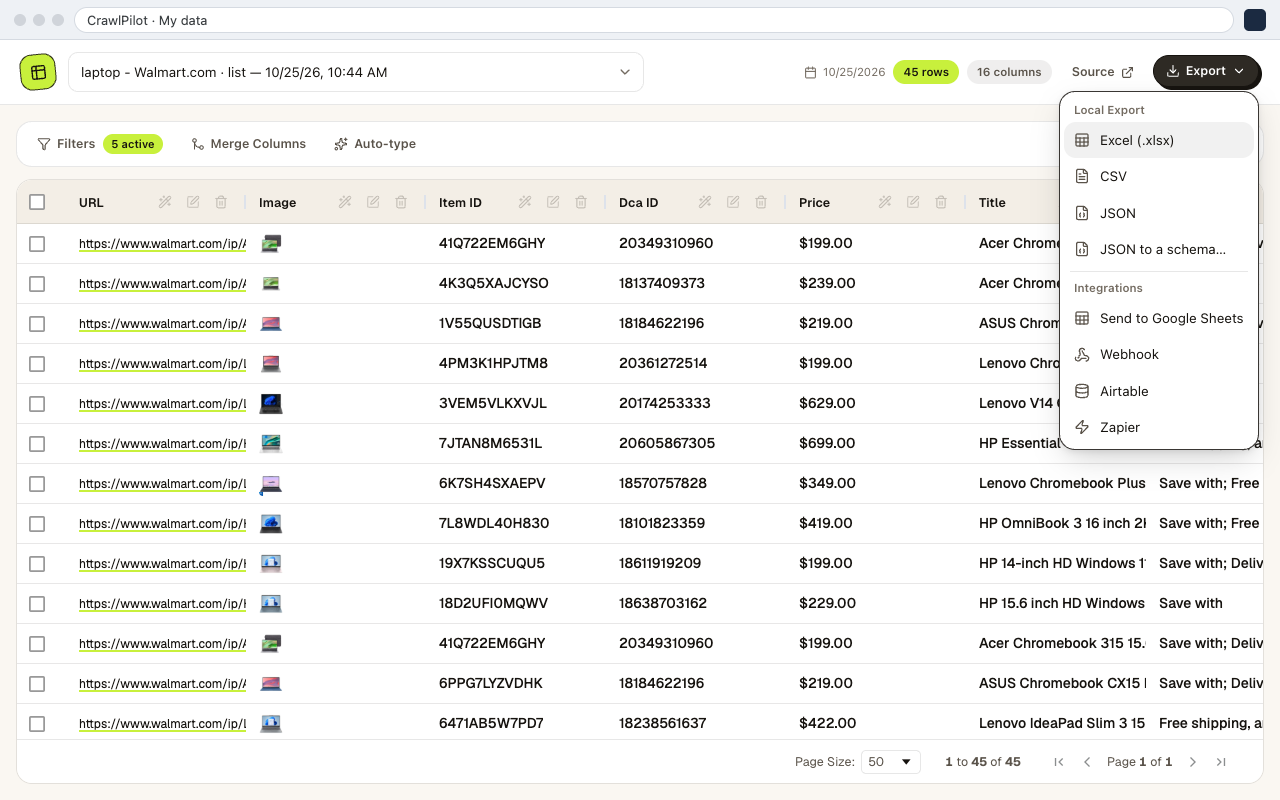
From the laptop search, one run produced 45 rows and 16 columns. These are the columns, with how many of the 45 rows had a value:
| Column | Filled | What it holds |
|---|---|---|
| Title | 45 | Full product name |
| Price | 45 | Current price, e.g. $199.00 |
| URL | 45 | Link to the product page |
| Image | 45 | Product image URL |
| Item ID | 45 | Walmart's item ID |
| Rating | 44 | Star rating, e.g. 4.4 |
| Review Count | 44 | Number of reviews |
| Was Price | 23 | Struck-through price on deals |
| From Price | 17 | "Options from" price when a cheaper variant exists |
| Badges | 29 | Overall pick, Best seller, Rollback, Sponsored… |
| Variants, Links | 10–12 | "3 sizes", and the links to each variant |
The first rows looked like this:
| Title | Price | Was Price | Rating | Reviews | Badges |
|---|---|---|---|---|---|
| Acer Chromebook 315 15.6" Touchscreen Laptop… | $199.00 | 4.4 | 510 | Overall pick; Sponsored | |
| ASUS Chromebook CX15 Laptop, 15.6" FHD… | $219.00 | 4.2 | 1680 | Best seller; Sponsored | |
| Lenovo V14 G5 14" FHD Laptop, Intel Core i7… | $629.00 | $999.99 | 4.6 | 7 | |
| Lenovo Chromebook Plus i 15.3" Laptop… | $349.00 | $469.99 | 4.2 | 80 | Rollback; Sponsored |
Prices keep their $ sign. In Excel, Text to Columns or =VALUE(SUBSTITUTE(B2,"$","")) turns them into numbers for sorting and formulas.
The Two-Click Run
You need Chrome and the free CrawlPilot extension. No account.
1. Search Walmart and open CrawlPilot. Run your search as usual, apply any filters (brand, price range, "in stock"), then click the CrawlPilot icon. The side panel recognises the listing and says how many products it sees:
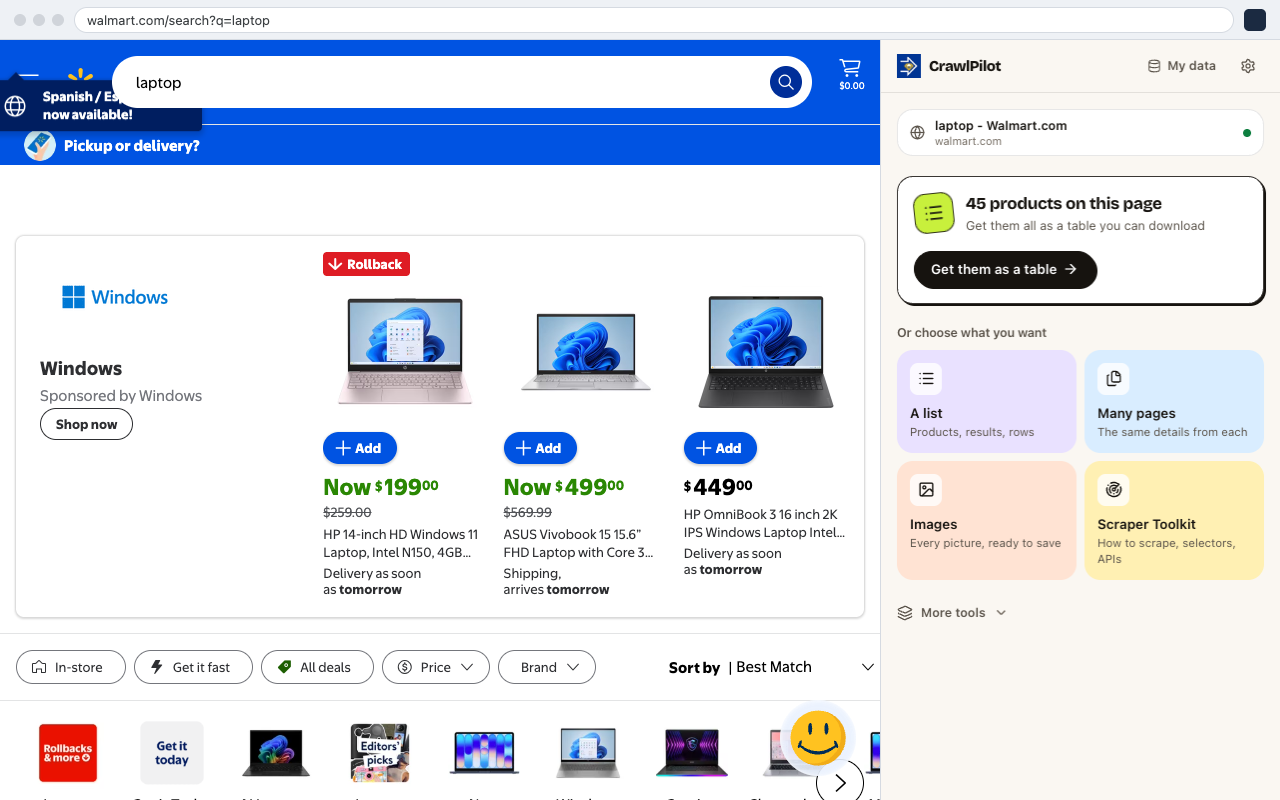
The first time, the panel may ask you to Allow access to the page. That's a one-time step (why).
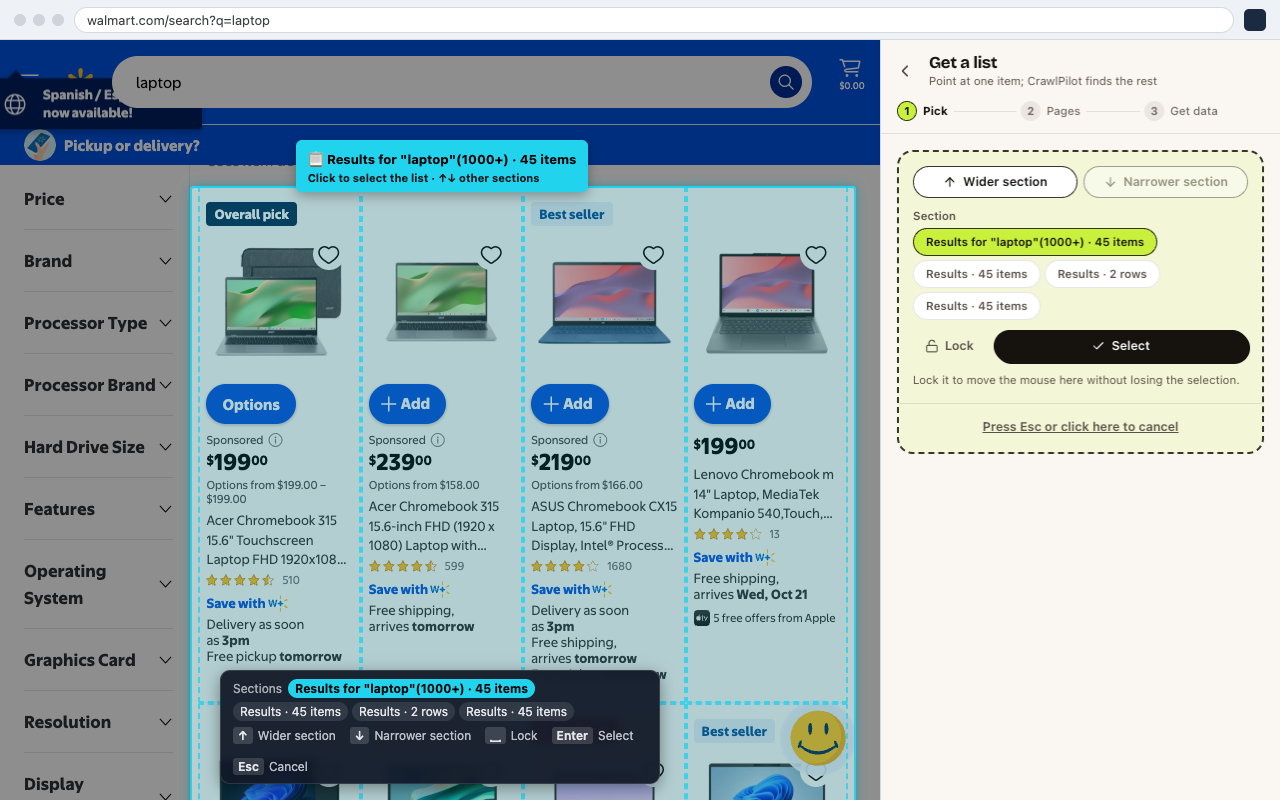
2. Point at one product. Click Get them as a table, then Point at one item, and hover over any laptop. The whole results grid lights up with its count:
Click the middle of the card, not the Add button. If the highlight grabs a sponsored shelf instead of the results, press ↓ for a narrower section or ↑ for a wider one.
3. Check the preview, then get the data. CrawlPilot shows the items found, the details per item, and a preview. It also finds Walmart's Next Page link by itself:
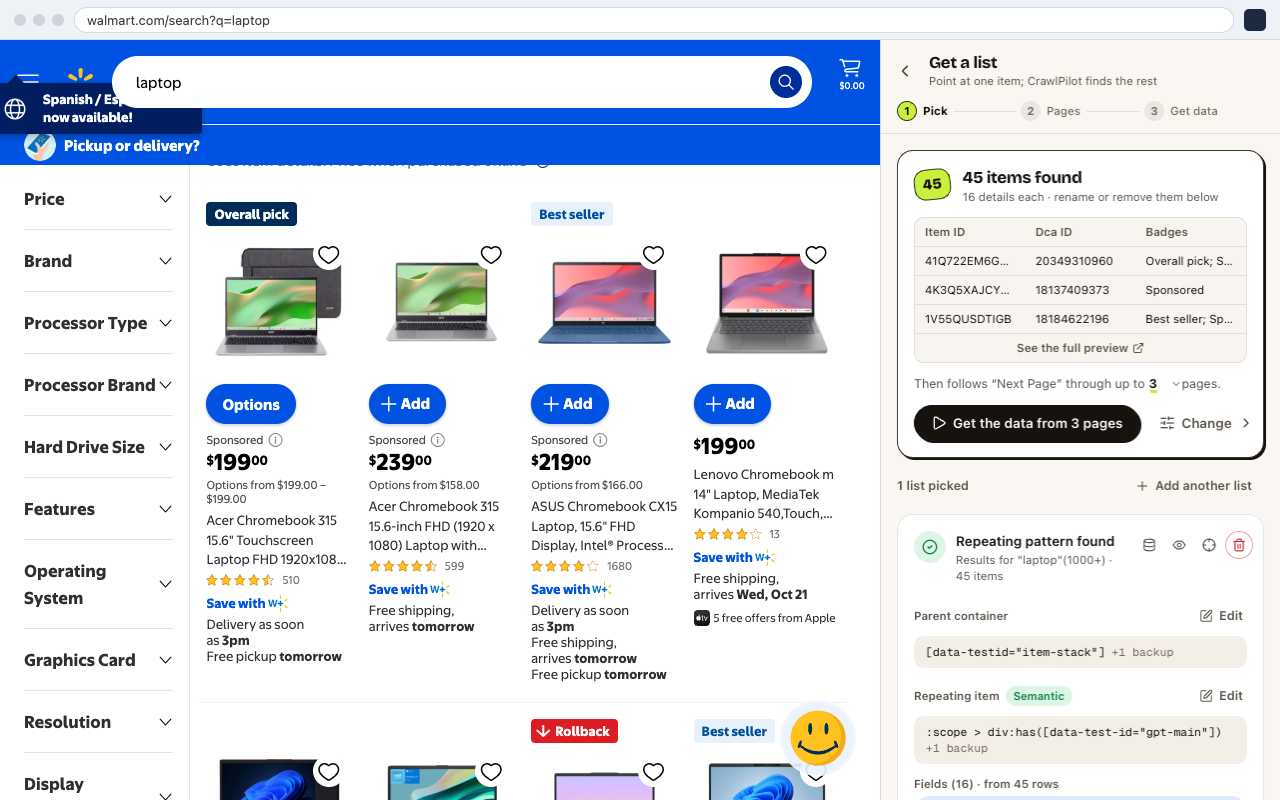
- 145 items found, with 16 details each.
- 2The first rows; See the full preview opens all of them.
- 3Walmart's Next Page link, followed for up to 3 pages.
- 4Starts the run.
- 5The repeating pattern it learned, each part with a backup.
Click the page number to read more pages, then Get the data from N pages. Keep the side panel open while it runs. Stop ends the run early and keeps every row read so far.
Exporting to Excel, CSV or Google Sheets
When the run says Done, click See your table. You can sort and filter there, then use Export:
- 145 rows and 16 columns from one run.
- 2Filters, Merge Columns and Auto-type tidy the table before you export.
- 3Item ID: remove duplicates on this column, not on Title (see below).
- 4Download as Excel, CSV or JSON.
- 5Or send to Google Sheets, a webhook, Airtable or Zapier.
- Excel (.xlsx) or CSV for a one-off price comparison.
- Send to Google Sheets if you'll repeat the search. New rows follow the same sheet (set it up).
Cleaning the Raw Export
The export is exactly what Walmart put on the page, which means a few things to tidy before you analyse it:
- Sponsored rows. 6 of the 45 rows carried a Sponsored badge. Filter the Badges column for "Sponsored" if you only want organic results.
- One product twice. The same Acer Chromebook (item
41Q722EM6GHY) appeared once as a sponsored card and once as an organic result. Remove duplicates on Item ID, not on Title. Titles of different models can be nearly identical. - Three kinds of price. Price is what it costs now. Was Price is filled only on deals (23 rows here). From Price is the cheapest variant's price, not this listing's. For a discount column, use
Was Price − Priceand leave From Price out of it. - The Options column collects the card's small print (delivery dates, "Free pickup"). Delete it unless you're comparing delivery promises.
- A missing rating (1 row here) means the product has no reviews yet, not a scraping error.
Adding Details From Each Product Page
The search grid doesn't show specs, seller or stock counts. Those live on each product page. When the run finishes, click Add details from each item's page. Point at the fields you want on one product page (say Processor, RAM and Sold by), and CrawlPilot reads every product page in a background window and adds those columns to the same table. See Page Extractor for the options.
Product pages are the heavy part of any Walmart scrape. Keep Pages at once low (2–3) and leave a pause between pages. You're reading Walmart in your own session, so a gentle pace is both polite and less likely to trip the bot check.
If You Write Code: The Data Is Already in the Page
CrawlPilot's Scraper Toolkit explains how a page is built. On this Walmart search, Recon found the listings embedded as JSON in __NEXT_DATA__, rendered in the server HTML, with a Next button for pagination:
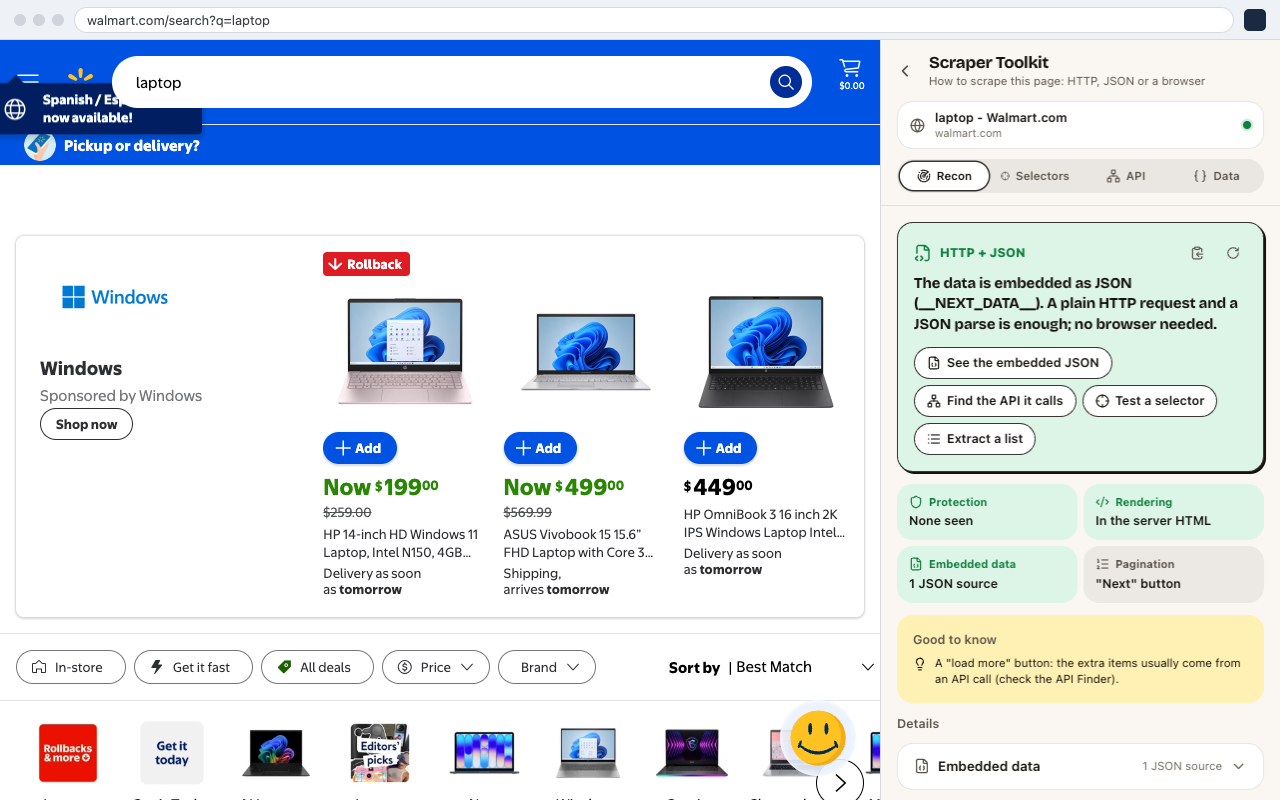
So a script can parse that JSON instead of the HTML cards, which survives layout changes much better. The catch is the one this guide opened with: the JSON only arrives if the request gets past the bot check. That's why a script needs proxies and browser fingerprints, and why reading the page in your own browser doesn't. Our posts on how Amazon detects scrapers and the anti-bot detection war cover that side in depth.
Questions
Can I scrape more than one page of results? Yes. CrawlPilot follows Walmart's Next Page link. Click the page count in the panel to raise it.
Why are there several price columns? Walmart shows a current price, a was-price on deals, and an "Options from" price for cheaper variants. Each gets its own column so none overwrites another.
Does Walmart block it? CrawlPilot reads the page in your own Chrome window, with your session, so it sees what you see. Reading many product pages very fast can still trigger Walmart's check, so keep the pace gentle.
Is it legal? Read Walmart's Terms of Use first. Collecting prices for your own research is different from republishing the catalogue. See is web scraping legal? for how courts have treated it.