Scraper Toolkit
The Scraper Toolkit is for people writing their own scrapers. It answers three questions about the page you're on:
- How should I scrape it?
- Which selector won't break?
- Which API does the page get its data from?
Open it from the CrawlPilot home screen → Scraper Toolkit. It has four tabs: Recon, Selectors, API and Data.
Recon: How Should I Scrape This Page?
Click Analyse this page. Recon gives a verdict and the facts behind it:
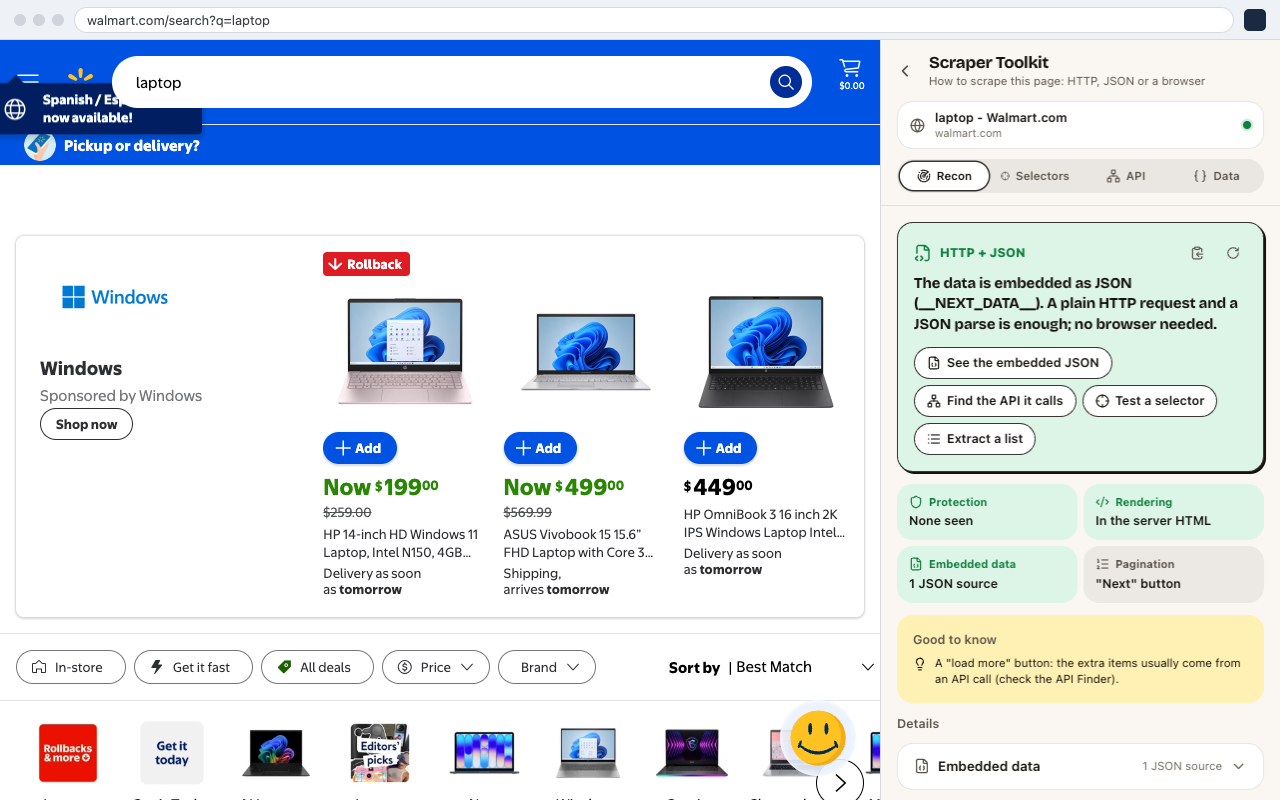
- Verdict tells you whether a plain HTTP request is enough, whether the data is in embedded JSON, or whether you need a real browser.
- Protection: any bot protection it sees.
- Rendering: whether the content is in the server HTML or built by JavaScript.
- Embedded data: JSON in the page, such as
__NEXT_DATA__or JSON-LD. - Pagination: how more results load.
The buttons under the verdict take you to the next step: See the embedded JSON, Find the API it calls, Test a selector or Extract a list.
Selectors: Find a Selector That Won't Break
Type a CSS selector or XPath, or click Pick an element on the page. Matches are highlighted on the page as you type. Use it in code gives you the selector as a snippet for Puppeteer, Playwright or Scrapy.
API: Skip the Page, Call Its API
- 01Record the page's calls while you scroll, search or click "Load more".
- 02Find a value you see on the page: type a price or a name, and API Finder shows which recorded call returned it.
- 03Turn that call into an API recipe. Get every page calls it page by page with your logged-in session, without opening a tab for each page.
Data
Shows the structured data already in the page, such as JSON-LD and embedded JSON state, so you can read fields without any selectors. Use in AI Extract opens it in AI Extract.