Page as Markdown
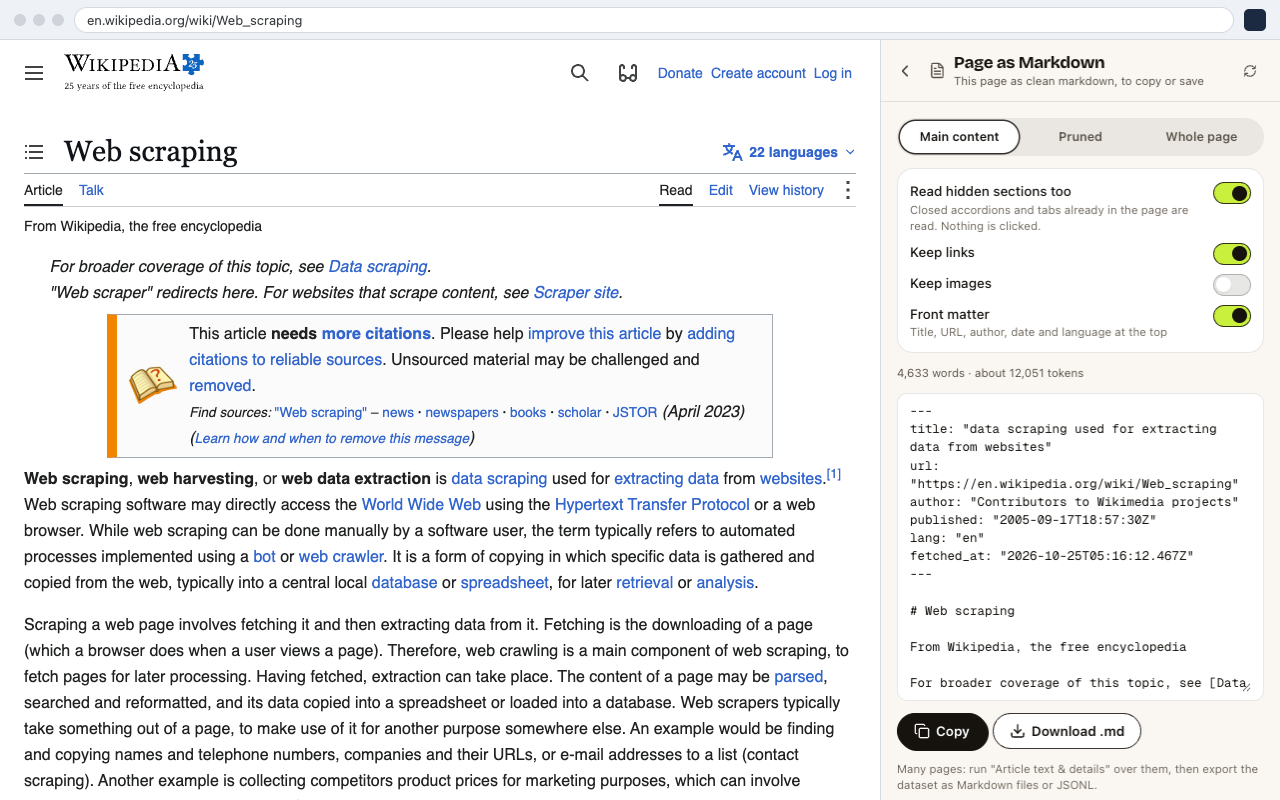
Page as Markdown turns the page you're on into clean Markdown, to copy or save as a .md file. It's useful for notes, documentation, or pasting into ChatGPT, Claude or another LLM without menus and ads.
How to Use It
- 01Open the page.
- 02Open CrawlPilot → More tools → Page as Markdown.
- 03Choose What to read:
- Main content: the article or main body only. Best for most pages.
- Pruned: the page with navigation, footers and boilerplate removed.
- Whole page: everything.
- 04Set the options:
- Read hidden sections too includes closed accordions and tabs that are already in the page. Nothing is clicked.
- Keep links and Keep images keep them as Markdown links and images.
- Front matter adds the title, URL, author, date and language at the top.
- 05Click Copy or Download .md.
The panel shows the word count and an estimate of the tokens, so you can tell whether the page fits in an LLM prompt.
Many Pages at Once
To convert a list of pages, use Same details from many pages with Article text & details. Then export the dataset as Markdown files (.zip) or JSONL for LLMs.